OpenAI Agents SDK, part by part: how the loop, tools, handoffs, guardrails and approvals actually work
A plain-language and engineering guide to the OpenAI Agents SDK (v0.24): the Runner loop, four kinds of tools, handoffs versus agents as tools, context, three kinds of guardrails and what they miss, sessions, approvals, tracing, the price of version 0.x, and when to pick something else.
OpenAI Agents SDK is used by 23.8% of developers who answered the agent-frameworks question in Stack Overflow’s 2026 survey, second only to LangChain. It has gone 19 months without a 1.0, and its default model changed twice between May and August. Below, each part comes first in plain words, then with its name in the code. Everything is checked against version 0.24.0 (October 15, 2026).
TL;DR
- An agent is a model with instructions and tools. A loop called the Runner keeps asking it what to do next until it gives a final answer, pauses for an approval, or hits the turn limit of 10.
- Eight parts make up the SDK: Agent, Runner, Tools, Handoffs, Context, Guardrails, Sessions with RunState, and Tracing.
- Guardrails cover less than their name suggests: input checks run on the first agent only, and tool checks skip handoffs, hosted tools and the built-in shell.
- Version 0.x is a real cost: the default model changed twice in three months. Set the model explicitly and pin the version.
- Pick it for a fast start on OpenAI models with a few specialist agents.
01 · The idea in plain words
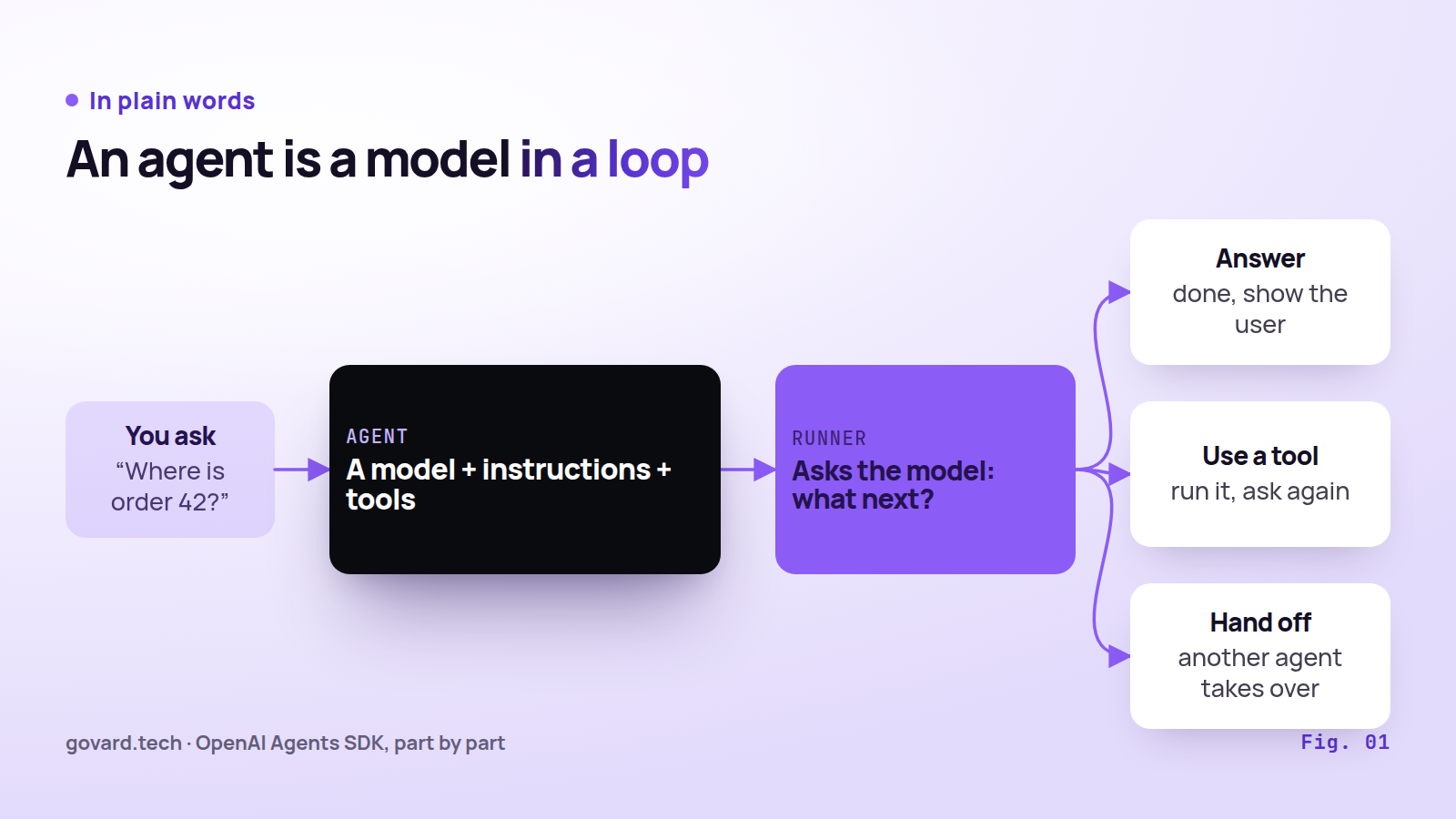
Source: OpenAI Agents SDK docs, Agents and Running agents.
Imagine a support assistant with a job description (“help with orders”), a brain (the language model) and a few allowed actions, such as looking up an order. In the SDK this bundle is an Agent.
The model cannot act on its own. The Runner sends it the question, reads the reply, runs the tool it asked for and sends the result back. Then it asks again. The loop ends on a final answer, on a tool that needs a person’s approval, or at the turn limit.
Everything else in the SDK adds memory to this loop, puts checks around it, or records what happened.
02 · Eight parts on one map
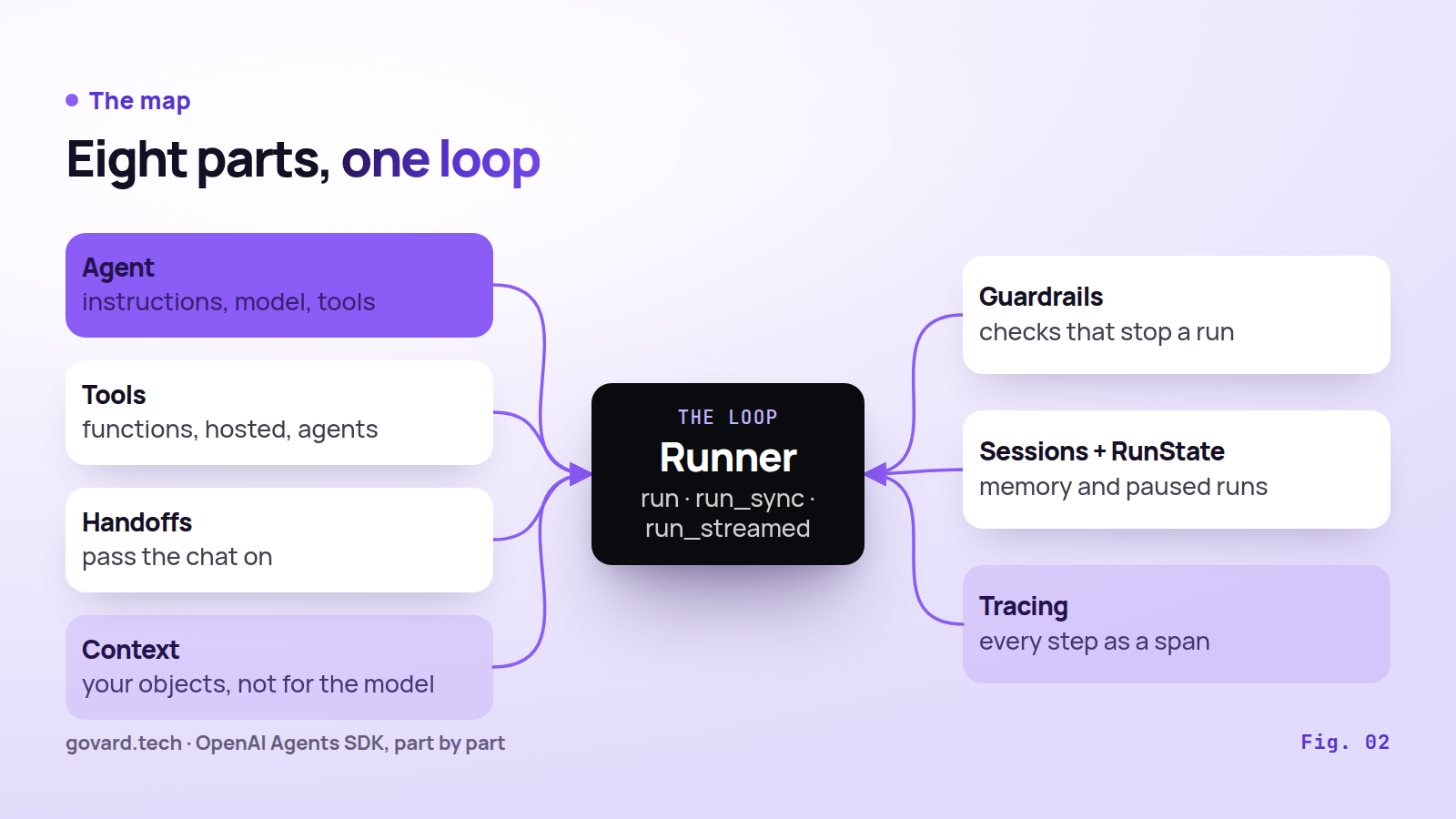
Source: OpenAI Agents SDK docs, v0.24.0.
| Part | In plain words | In code |
|---|---|---|
| Agent | The job description, the model and the allowed actions | Agent(name, instructions, model, tools, handoffs, output_type, ...) |
| Runner | The loop that keeps the conversation going | Runner.run(), run_sync(), run_streamed() |
| Tools | Things the agent can do | @function_tool, hosted tools, agent.as_tool() |
| Handoffs | Passing the conversation to a specialist | handoffs=[...], handoff() |
| Context | Your app’s objects that tools can use | RunContextWrapper[T] |
| Guardrails | Checks that can stop a run | input, output and tool guardrails |
| Sessions and RunState | Memory of the chat and a saved paused run | SQLiteSession, RunState |
| Tracing | A record of every step | traces and spans, on by default |
instructions can be a fixed string or a function that builds the prompt from the context. output_type defines what “finished” means. Without it, the final answer is plain text. With it, the model must return an object of that type; any type Pydantic can wrap works.
03 · One run, step by step
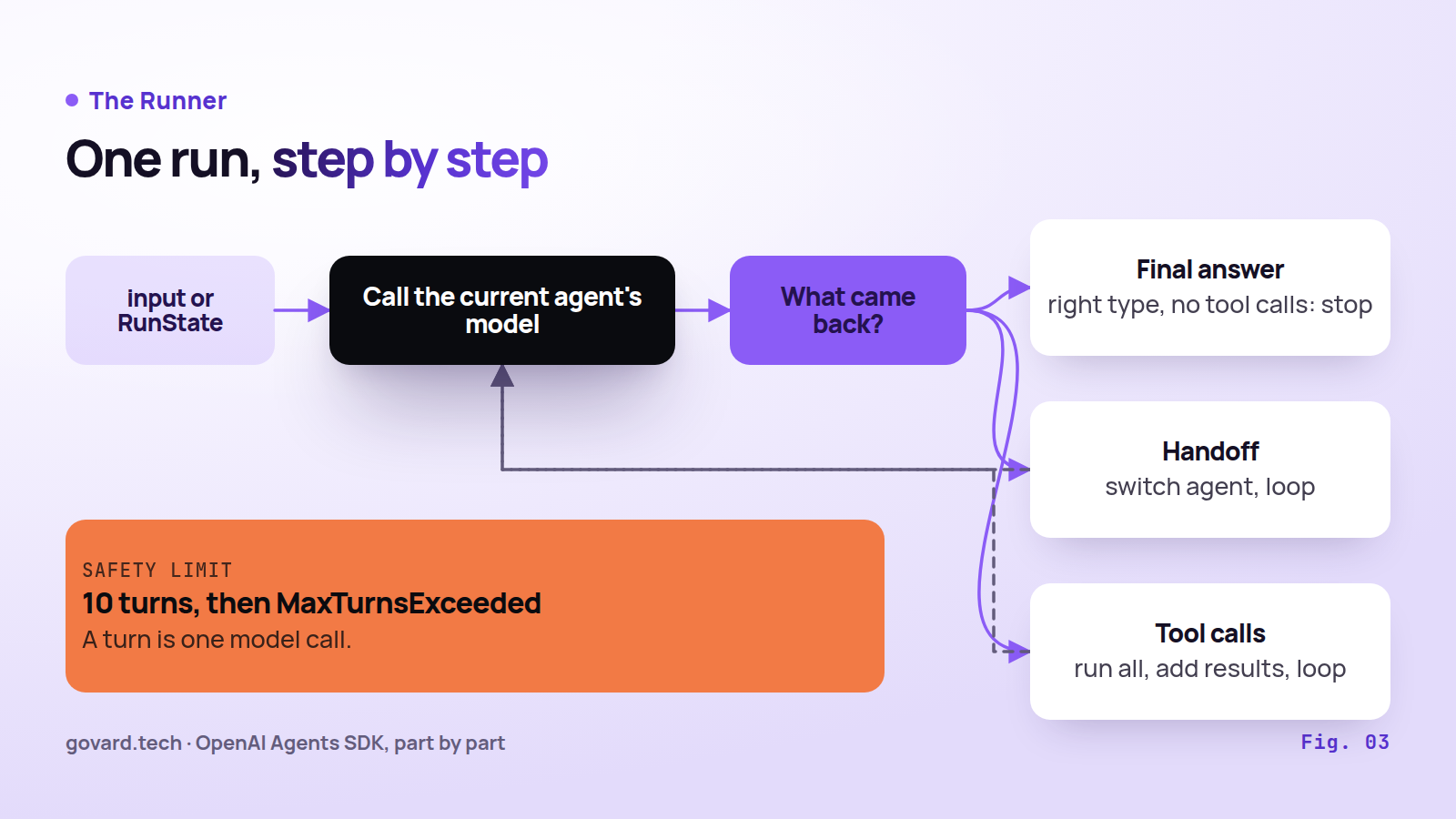
Source: Running agents docs; DEFAULT_MAX_TURNS in src/agents/run_config.py.
The documentation describes the loop in four moves:
- Call the model of the current agent with the current input.
- If it returns text of the right type and no tool calls, that is the final output. The run ends.
- If it asks for a handoff, switch the current agent and loop.
- If it asks for tools, run all of them, add the results to the input, and loop.
A turn is one model call. The default limit is 10 turns (DEFAULT_MAX_TURNS in the code). Past it, the Runner raises MaxTurnsExceeded. max_turns=None removes the limit, and error_handlers can return a fallback answer instead of an exception.
The result holds more than the answer. final_output goes to the user. new_items lists every step with its agent, tool and handoff. to_input_list() gives the input for the next turn if you keep history yourself.
04 · Four kinds of tools
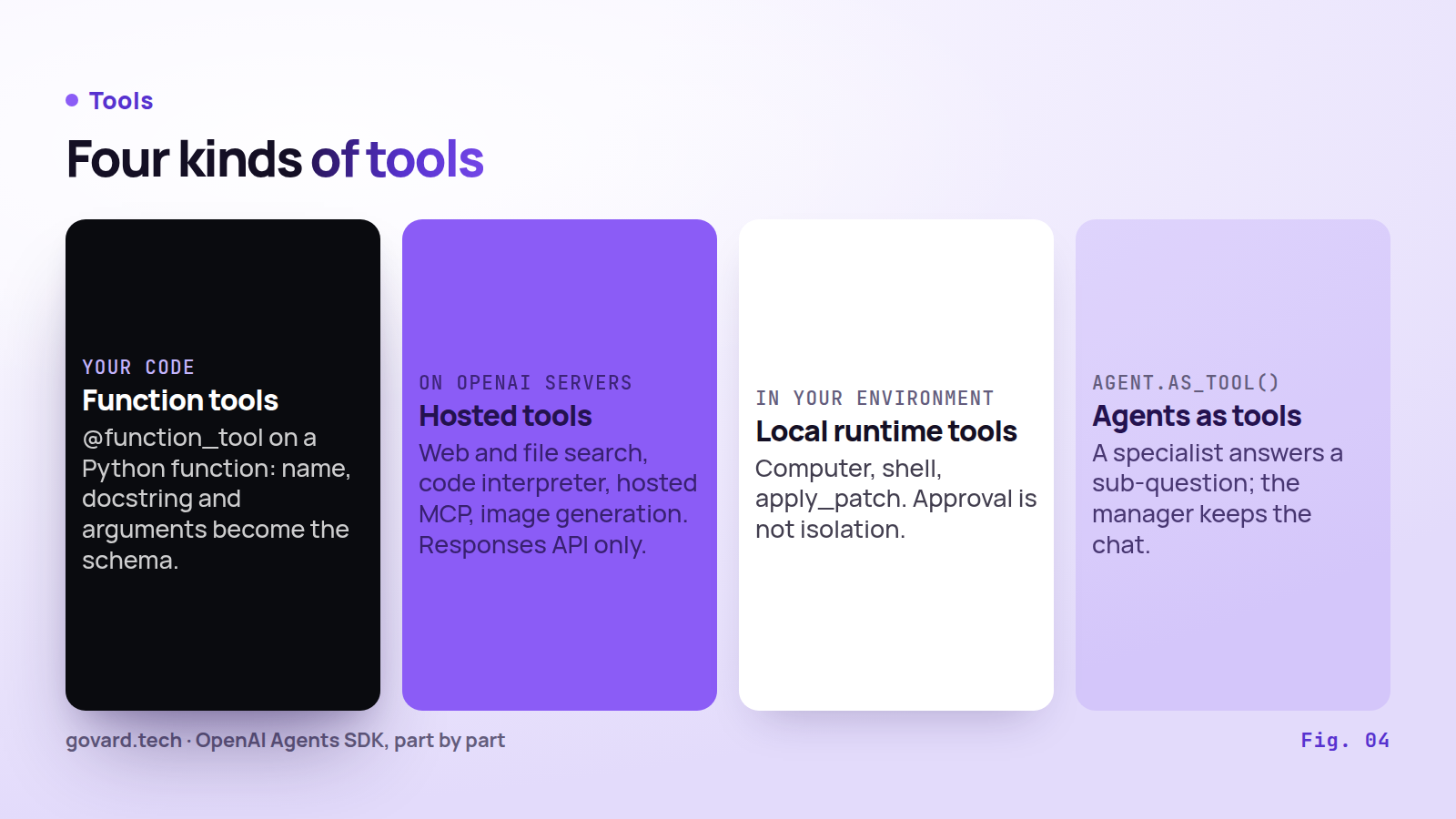
Source: Tools docs, v0.24.0.
- Function tools. Put
@function_toolon any Python function. The name comes from the function, the description from the docstring, the schema from the arguments. - Hosted tools. These run on OpenAI’s servers: web search, file search, code interpreter, hosted MCP, image generation, tool search and programmatic tool calling. They work only with the Responses API model.
- Local runtime tools. Computer and apply_patch run in your environment; shell runs locally or in a hosted container. Local shell and apply_patch need no approval by default, and the docs are explicit that approval is not isolation: “SDK approval does not provide a sandbox.”
- Agents as tools.
agent.as_tool()lets one agent call another for a bounded subtask.
When a function tool fails, the model is told that an error occurred, and the loop goes on. With failure_error_function=None, the error is raised to your code instead.
05 · Handoff or agent as a tool
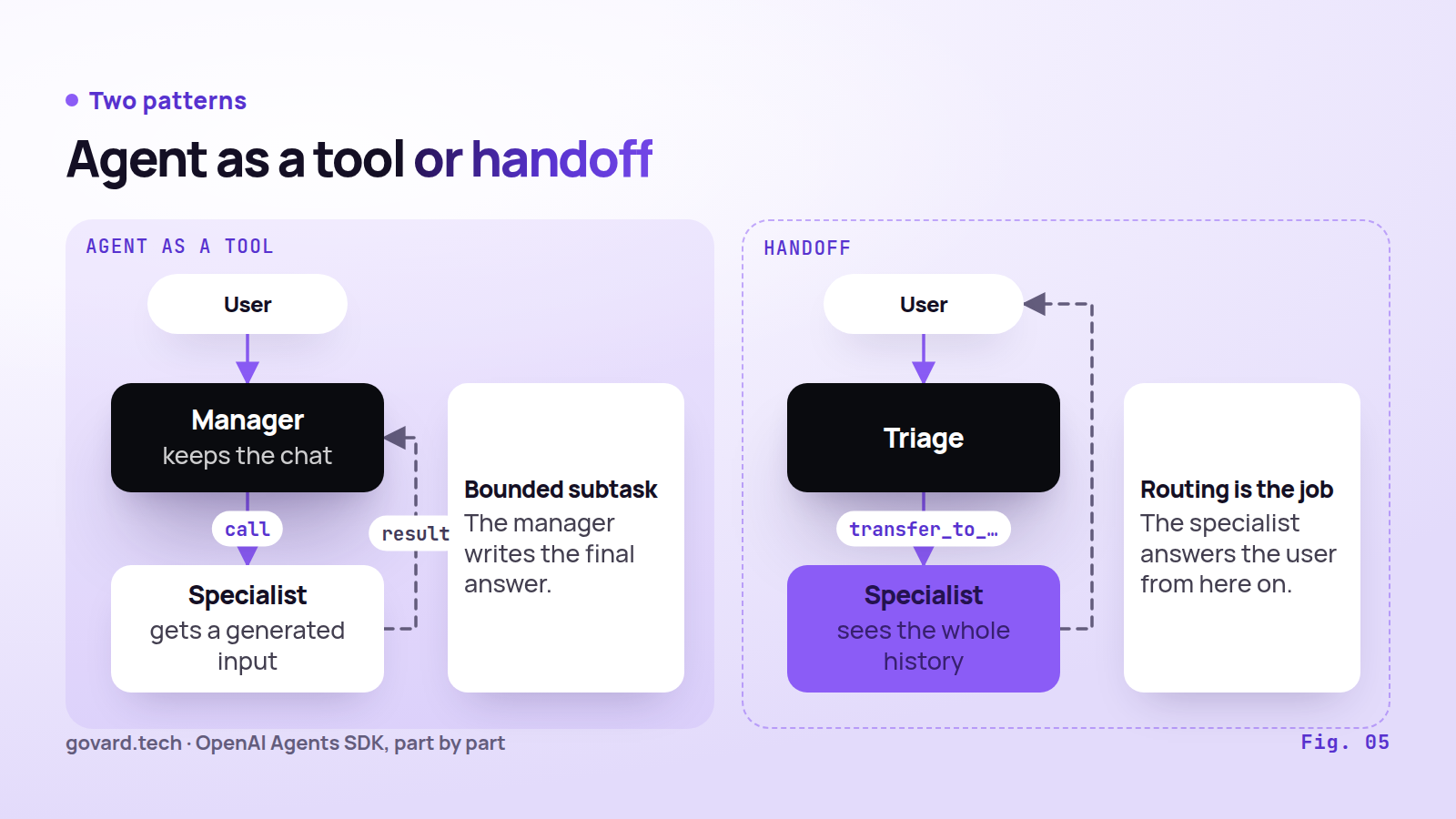
Source: Handoffs and Multi-agent docs; docstring of Agent.as_tool.
To the model, a handoff is just another tool. A handoff to Refund Agent appears as a tool called transfer_to_refund_agent. When the model calls it, the Runner switches agents, and the new agent sees the entire conversation. An input_filter such as remove_all_tools trims what it sees. It drops tool calls and leaves text inside messages as it was. on_handoff runs your code at the switch.
With an agent used as a tool, the specialist gets only a generated input and the manager keeps the conversation. Use agents as tools when a specialist should answer a narrow question and the manager should write the final reply. Use handoffs when routing is the job and the specialist should talk to the user from then on. The two combine: a triage agent can hand off to a specialist that calls other agents as tools.
06 · Two meanings of “context”
The word means two different things in the SDK, and mixing them up causes bugs.
- Local context is any object you pass to
Runner.run(..., context=...): the current user, a database session, settings. Every tool, hook and handoff receives it wrapped inRunContextWrapper. The docs are clear: “The context object is not sent to the LLM.” - Model context is what the model actually reads: instructions, the input and history, session items and tool outputs. To give the model a fact, put it there.
One warning from the docs matters in production. When you pause a run for approval and serialize its RunState, the local context is saved with it: “Avoid putting secrets in RunContextWrapper.context if you intend to persist or transmit serialized state.”
07 · Guardrails: three kinds, and what they miss
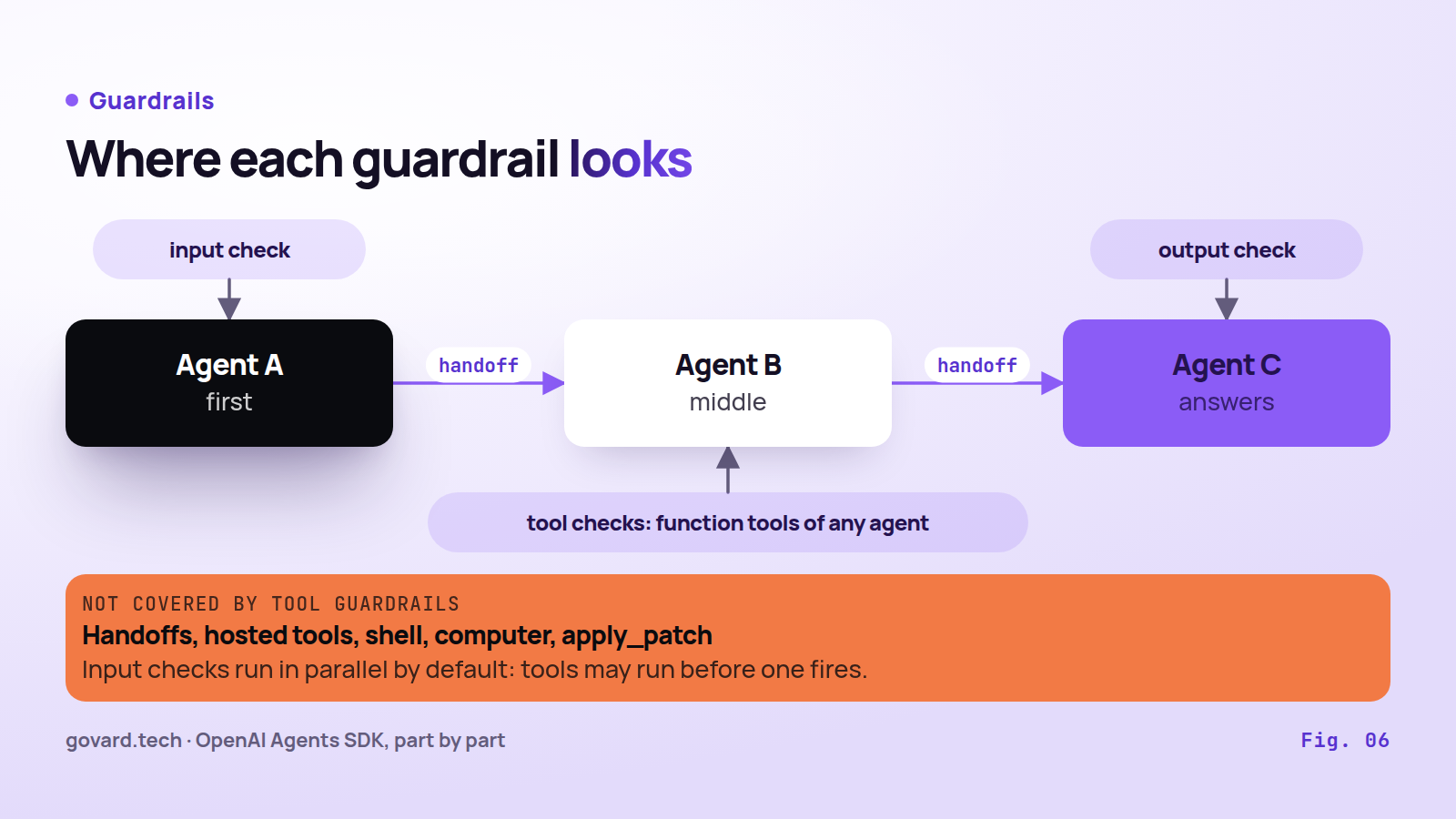
Source: Guardrails docs, v0.24.0.
A guardrail is a function that inspects something and can trip a wire, which raises an exception and stops the run. There are three kinds:
- Input guardrails check the user’s input. They run only for the first agent in the chain.
- Output guardrails check the final answer. They run only for the agent that produces it.
- Tool guardrails check the input and output of each function tool call. They can skip the call, replace the output, or trip the wire.
The coverage gaps are in the guardrails docs themselves. Handoffs go through their own pipeline, so tool guardrails do not apply to the handoff call. Hosted tools and the built-in execution tools (ComputerTool, ShellTool, ApplyPatchTool, LocalShellTool) do not go through tool guardrails, and Agent.as_tool() does not expose tool-guardrail options directly. The docs give the fix for multi-agent setups: “use tool guardrails instead of relying only on agent-level input/output guardrails.”
Timing matters too. Input guardrails run in parallel with the agent by default, which is fast, but “if the guardrail’s tripwire is triggered, the agent may have already consumed tokens and executed tools before being cancelled.” Set run_in_parallel=False before tools that send, pay or delete: the check then finishes first, and a tripped wire means the agent never starts. Output guardrails always run after the agent.
08 · Memory and approvals
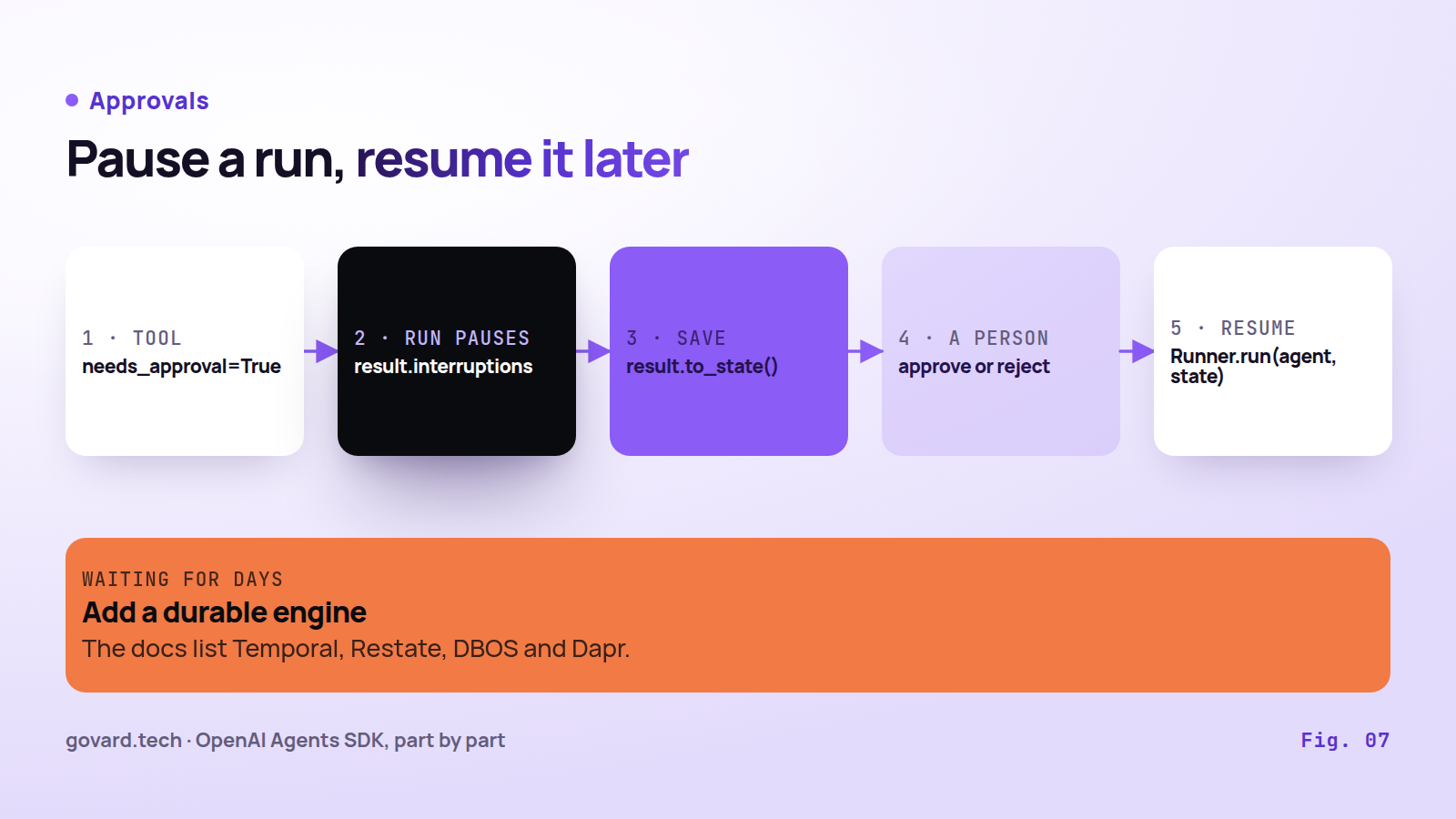
Source: Sessions and Human-in-the-loop docs.
Sessions give an agent memory across runs. Before each run, the session loads the history; after it, the session stores every new item. Backends include SQLite, Redis, SQLAlchemy, MongoDB, Dapr and OpenAI’s Conversations API.
Pick one way to keep state per conversation: your own list, a session, conversation_id or previous_response_id. The docs warn that mixing them “can duplicate context.”
Approvals work like this. Mark a tool with needs_approval=True. When the model calls it, the run pauses and the pending calls appear in result.interruptions. Save the run with result.to_state(), store it as JSON in a database or a queue, let a person approve or reject, then resume with Runner.run(agent, state). For waits of hours or days that must survive restarts, the docs list integrations with Temporal, Restate, DBOS and Dapr.
09 · Streaming, tracing and hooks
Streaming. Runner.run_streamed() gives three kinds of events: raw tokens for the UI, a finished step (tool called, handoff requested), and an agent change after a handoff. The run is complete only when the iterator ends.
Tracing is on by default. Each run is a trace, and each agent, model call, tool, guardrail and handoff is a span inside it. Traces go to OpenAI’s dashboard; add_trace_processor adds other systems, and the docs list about thirty. It keeps the OpenAI exporter on; to stop sending traces to OpenAI, replace the processors with set_trace_processors(). Two defaults need a decision. trace_include_sensitive_data is True, so model and tool inputs and outputs are stored. Under Zero Data Retention, tracing is unavailable.
Hooks run your code when an agent starts or ends, around each model and tool call, and on each handoff.
10 · Models and the price of version 0.x
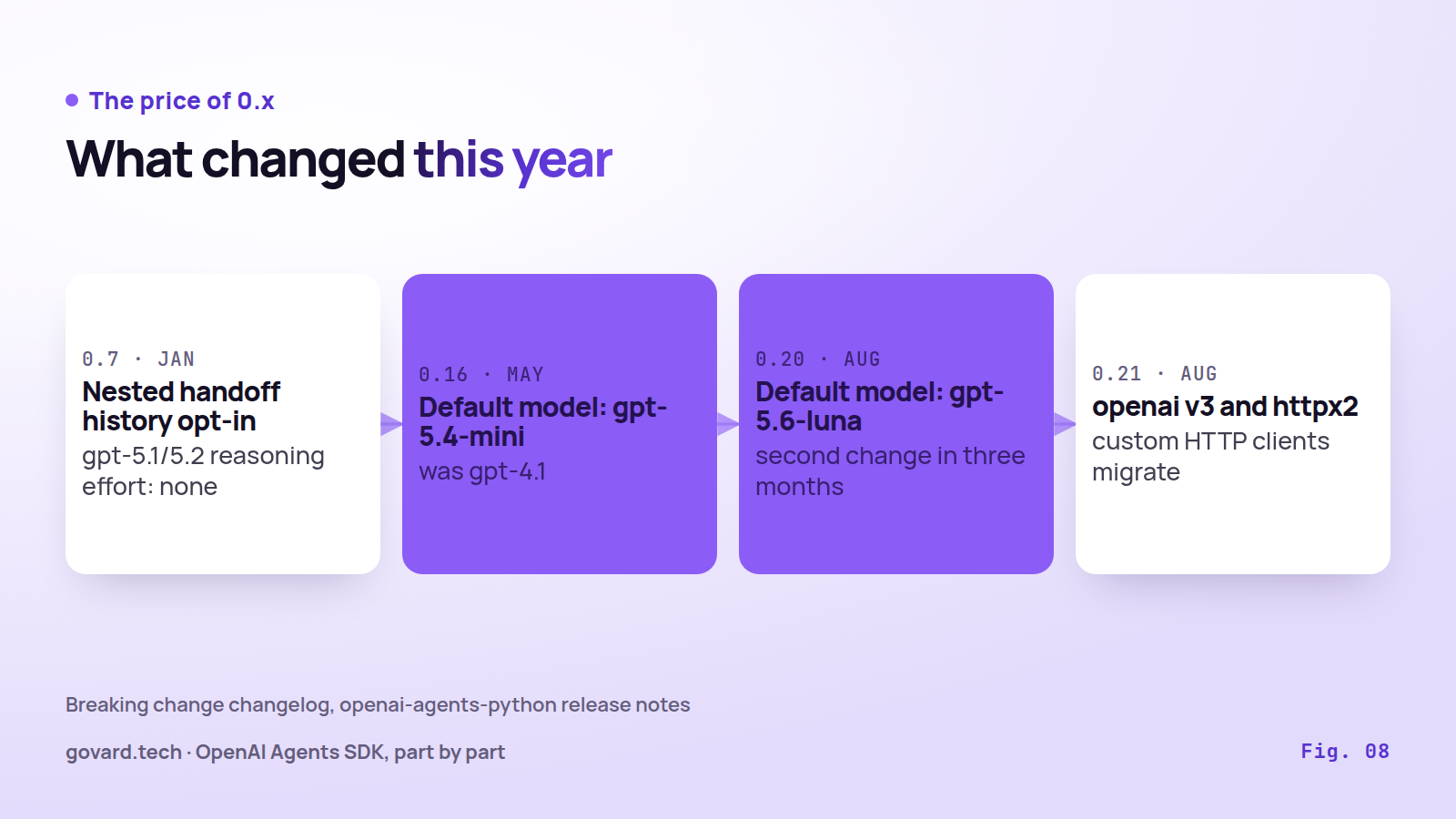
Source: Breaking change changelog in the SDK release notes.
The SDK uses OpenAI’s Responses API by default; hosted tools and server-side state need it. A Chat Completions model works with compatible providers and drops Responses-only fields without an error. LiteLLM and Any-LLM adapters reach other providers; the docs call them “best-effort, beta.”
If an agent does not name a model, the SDK picks one, and that default has moved twice: to gpt-5.4-mini in 0.16.0 (May 7) and to gpt-5.6-luna in 0.20.0 (August 11). Minor versions may contain breaking changes by the project’s own rule, and the release notes show it:
| Version | Date | What changed |
|---|---|---|
| 0.7.0 | Jan 23, 2026 | Nested handoff history became opt-in; reasoning effort for gpt-5.1/5.2 defaults to none |
| 0.15.0 | May 1, 2026 | Model refusals raise ModelRefusalError instead of empty output or a retry loop |
| 0.16.0 | May 7, 2026 | Default model gpt-4.1 → gpt-5.4-mini |
| 0.20.0 | Aug 11, 2026 | Default model → gpt-5.6-luna |
| 0.21.0 | Aug 15, 2026 | Requires openai v3; custom HTTP clients move from httpx to httpx2 |
The practical rule: set model= on every agent, pin the SDK to 0.24.*, and read the breaking change changelog before every upgrade.
11 · What is changing around it
OpenAI shuts down Agent Builder, its visual workflow editor, on November 30, 2026. The migration guide offers two paths: the Agents SDK for code, ChatGPT Workspace Agents for teams that build in natural language. The code export “does not convert your workflow graph.”
The SDK itself keeps growing beyond the text loop. Sandbox agents (0.14, April 2026) get a workspace with files, a shell and snapshots. Programmatic tool calling (0.19, July 2026) lets the model write JavaScript that calls your allowed tools in a V8 sandbox. Realtime agents and the voice pipeline cover speech.
12 · When to take it, and what to set first
| LangGraph | OpenAI Agents SDK | |
|---|---|---|
| Shape | A graph you define | A loop with handoffs |
| State | A checkpoint after every step | Session plus RunState on pause |
| Long waits | Built into the runtime | Through Temporal, Restate, DBOS or Dapr |
| Version | 1.x since October 2025 | 0.x, breaking changes in minors |
Take it for a fast start on OpenAI models with a few specialist agents, approvals on risky tools, and tracing you can read on day one. The docs give the design rule: “Have specialized agents that excel in one task, rather than having a general purpose agent that is expected to be good at anything.”
Pick something else, or budget extra work, when most of your models are not OpenAI, when you work under Zero Data Retention, or when you need state saved after every step.
Four settings to make explicit before production:
model=on every agent, and the SDK pinned to0.24.*.run_in_parallel=Falseon input guardrails that sit in front of tools that send, pay or delete.- Tool guardrails on every function tool in multi-agent flows, plus approvals or a real sandbox for shell, computer and apply_patch.
- A
workflow_namefor traces and a decision ontrace_include_sensitive_data, or your own processors viaset_trace_processors().
This guide is part of a series on agent frameworks in production; the series starts with the ranking of ten frameworks by production evidence. Before you trust any of them, evaluate the agent the way you would test a release.
FAQ
What is the OpenAI Agents SDK? A Python and TypeScript library from OpenAI for building agents: a model with instructions and tools, run in a loop by a Runner. It adds handoffs between agents, guardrails, session memory, approvals and tracing. It works with OpenAI models by default and with other providers through compatible APIs and beta adapters.
What is the difference between a handoff and an agent used as a tool? With a handoff, the new agent receives the conversation history and takes over the conversation. With an agent used as a tool, the specialist receives a generated input, answers one sub-question, and the original agent keeps the conversation.
Do guardrails in the OpenAI Agents SDK check every agent and tool? No. Input guardrails run only for the first agent in the chain, output guardrails only for the agent that produces the final output, and tool guardrails only for function tools. Handoff calls, hosted tools and built-in execution tools such as shell, computer and apply_patch do not go through tool guardrails.
How many turns does an agent get before it stops? Ten by default. A turn is one model call. Past the limit the Runner raises MaxTurnsExceeded; you can pass max_turns=None to remove the limit or use error_handlers to return a fallback answer.
When should I pick another framework? When most of your models are not OpenAI (third-party adapters are beta and tracing still uploads to OpenAI), when you run under Zero Data Retention (tracing is unavailable), or when you need the state saved after every step, which LangGraph does by design.