Pydantic AI, part by part: the typed agent loop, eight kinds of retry and the V2 capabilities model
An architecture guide to Pydantic AI 2.66: the typed Agent, dependencies and RunContext, tools and toolsets, typed output, the run graph and its limits, eight retry layers that multiply, approvals and durable engines, capabilities and Harness, multi-agent levels, evals and the V1 to V2 migration.
Pydantic AI is a typed agent loop for Python. You declare what an agent needs and what it must return, and the library makes your code, your type checker and the model work from those same types. In our production ranking of ten agent frameworks it sits fifth: 8.9% of agent-framework users in Stack Overflow’s 2026 survey had used it in the past year (390 of 4,400). One ordinary call can become 18 requests on the network, and on Temporal the worst case has no ceiling: that is where this guide spends most of its time. It takes the library apart piece by piece, from the Agent class down to the retry layers that multiply each other, and ends with when to take it and when not to. Everything is checked against the documentation in the pydantic/pydantic-ai repository and the package pydantic-ai 2.66.0, released on November 4, 2026.
TL;DR
- An agent is
Agent[Deps, Output]: a container for a model string, instructions, tools, a dependency type and an output type. The run either returns that output type or fails. - Your services (database pools, HTTP clients, keys) travel beside the prompt through
RunContext, not inside it. A tool’s signature and docstring become its schema, and arguments are validated before your code runs. - Under the hood a run is a small graph: user prompt, model request, tool calls, end. By default a run may make 50 model requests and then raises.
- “Retry” means eight different things at eight layers that don’t share budgets. The docs’ own example turns one logical call into 18 requests.
- V2 (June 2026) made capabilities the building block. Memory, sub-agents, guardrails and a full coding agent ship in a separate Harness package with 80+ capabilities.
01 · What Pydantic AI is, and where it came from
The project describes itself as “the Python AI SDK: a typed, extensible agent loop with every model a string swap away, and another one to fall back to when a provider fails”. It comes from the team behind Pydantic, so the types are the contract the code runs on.
The core promise sits in one sentence of the README: the tool signature and docstring become the tool schema, “arguments are validated before your code runs, and the run is guaranteed to return a Sentiment [the output type in the README example], so your IDE, type checker, and the LLM all agree on the returned type.”
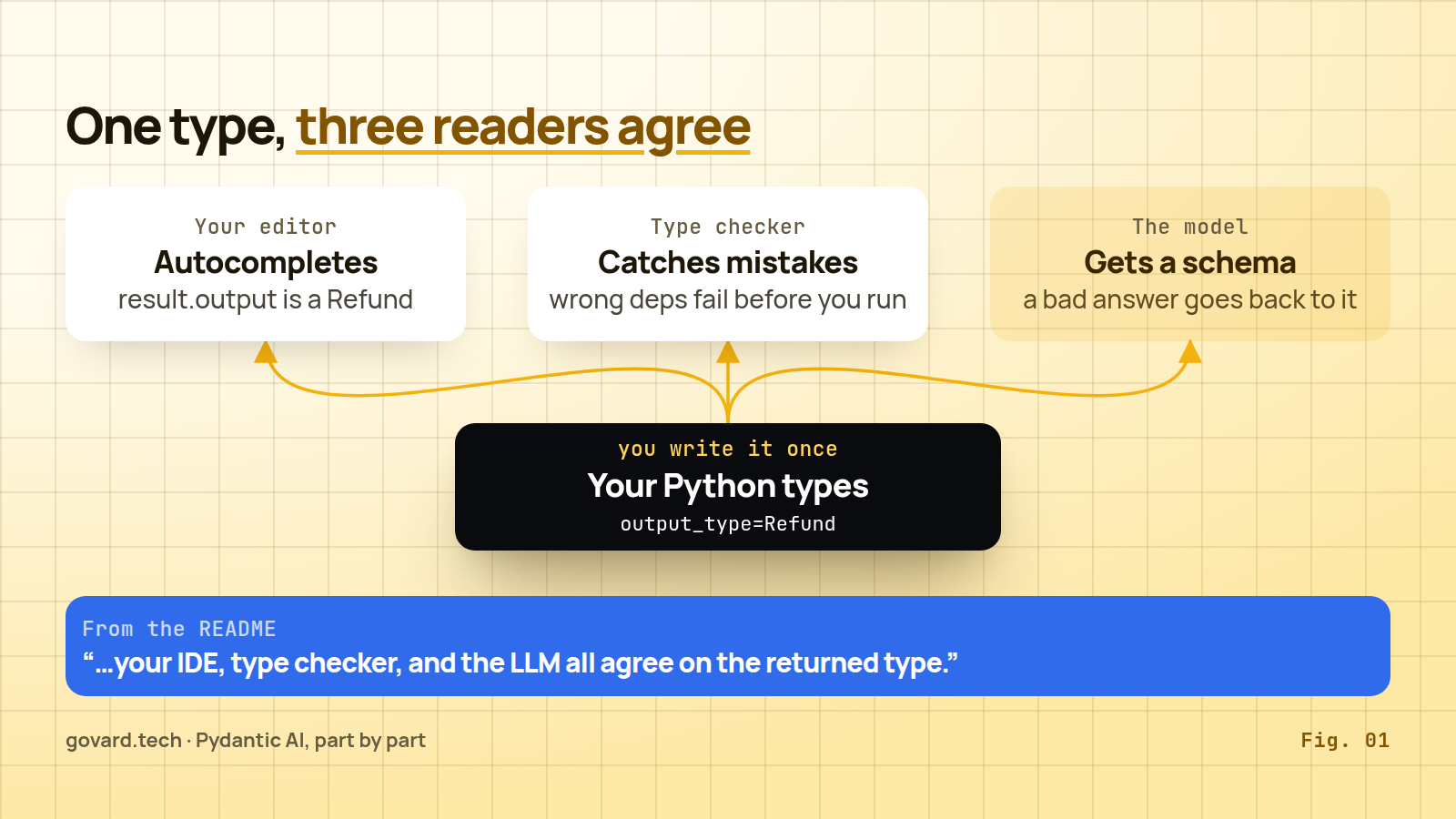
Source: the Pydantic AI README, November 2026.
The version history matters, because it shapes how much you can trust the API you write against today.
| Date | Release | What it meant |
|---|---|---|
| September 2025 | V1.0 | ”no changes that break your code until V2” |
| May 20, 2026 | V2 beta | forked from v1.100.0 |
| June 23, 2026 | V2.0 | ”a harness-first design with capabilities as a core primitive” |
| November 4, 2026 | 2.66.0 | releases every one to three days; V1 still gets 1.107.x fixes |
V2 arrived nine and a half months after the V1 promise. The project kept its word in the narrow sense: the break came with a major version, and the version policy commits to three things. “We will not intentionally make breaking changes in minor releases.” V3 will not ship sooner than three months after V2.0. V1 receives security fixes for at least six months after V2’s stable release. V3 can ship any time now: the policy only ruled it out before September 23, 2026. Minors arrive almost daily: 2.62.0 on October 27, 2.66.0 on November 4.
pydantic-graph and pydantic-evals move in step at 2.66.0, pydantic-ai-harness is at 0.66.0, and Python 3.11+ is required.
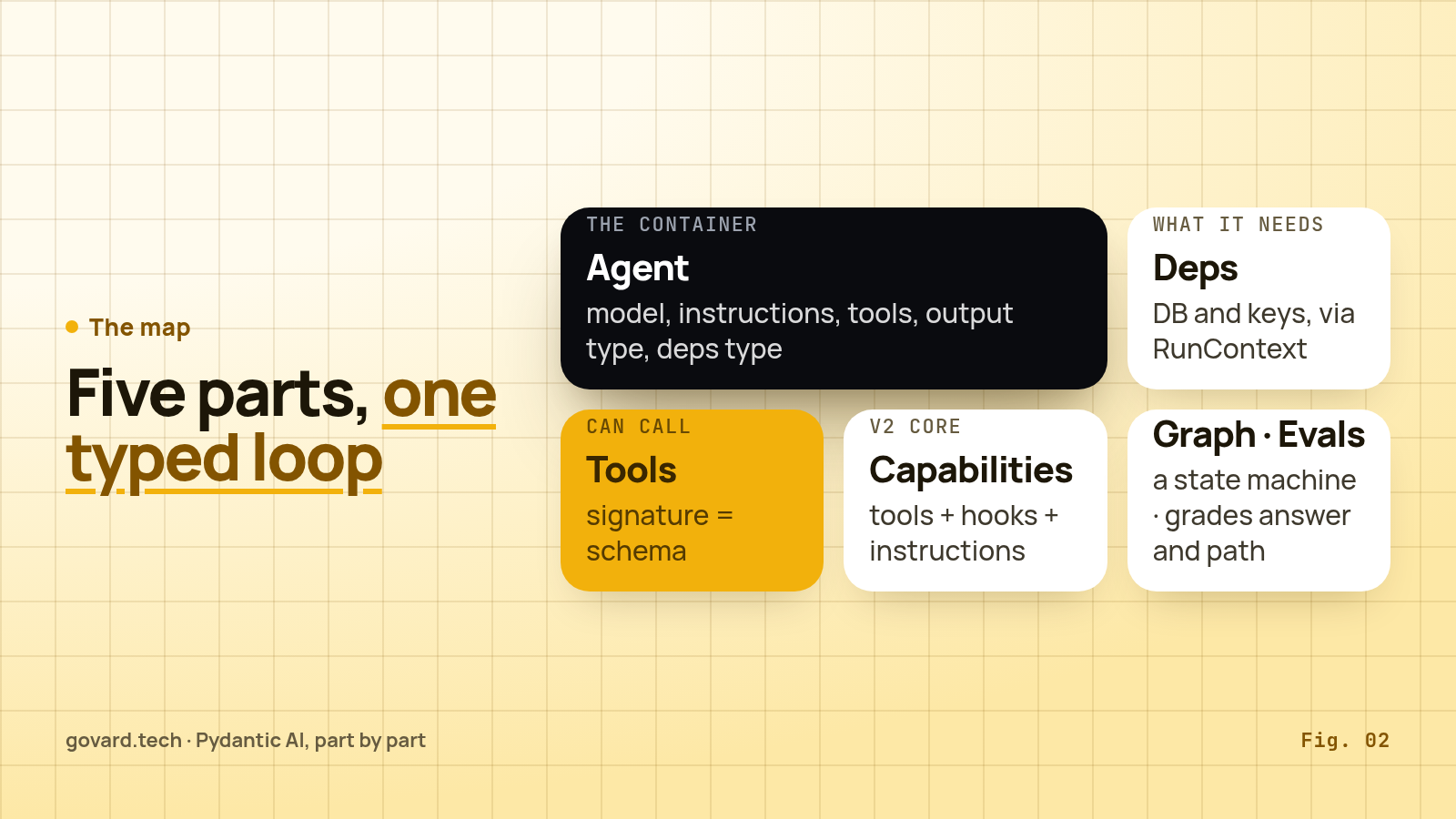
The map. Pydantic AI has five parts you will meet in any real project:
- Agent. The container. The docs list what it holds: instructions, function tools and toolsets, a structured output type, a dependency type constraint, a model, model settings and capabilities.
- Dependencies. Your services, passed per run and reached through
RunContext. - Tools. Python functions the model can call. Their signature and docstring are the schema the model sees.
- Capabilities. The V2 building block: “a reusable, composable unit of agent behavior” that bundles tools, hooks, instructions and model settings.
- Graph and Evals. Two separate libraries.
pydantic-graphis a typed state machine with no dependency onpydantic-ai.pydantic-evalsgrades both an agent’s answers and the path of tool calls it took.
Observability, UI adapters (AG-UI and the Vercel AI data stream protocol) and durable engines can wait until later.
Source: Pydantic AI docs, November 2026.
02 · The agent: a container with two type parameters
The docs put it plainly: “agents are generic in their dependency and output types”. An agent that needs a Shop client and returns a Refund is an Agent[Shop, Refund], and the type checker knows it. Here is the smallest complete example from the documentation, a roulette wheel, lightly shortened:
roulette_agent = Agent(
    'openai:gpt-5',
    deps_type=int,
    output_type=bool,
    instructions='Use the `roulette_wheel` function to see if the customer has won based on the number they provide.',
)

@roulette_agent.tool
async def roulette_wheel(ctx: RunContext[int], square: int) -> str:
    """check if the square is a winner"""
    return 'winner' if square == ctx.deps else 'loser'
Four things happen in these few lines. The model is one string. deps_type=int tells the type checker what the dependencies are; the docs stress that you pass “the type here, NOT an instance”, and the value comes with each run. output_type=bool means the run returns a boolean or fails. And @roulette_agent.tool registers a function the model can call, with RunContext[int] as its first parameter.
Create an agent once and use it globally, “as you would a small FastAPI app”. Prefer instructions over system_prompt: with an explicit message history, earlier instructions are not resent, while a system prompt stays.
Five ways to run it.
| Method | What you get |
|---|---|
run() | await it, get a result with the whole response |
run_sync() | the same, as a plain synchronous function for scripts |
run_stream() | an async context manager that streams text or structured output as it arrives |
run_stream_events() | an async context manager over every event, ending with the final result |
iter() | an async iterable over the nodes of the agent’s underlying graph |
There is also run_stream_sync(). Note that run_stream() treats the first output matching the type as final, while run() and run_stream_events() “always run the agent graph to completion”.
Models are strings. “Pass a name in the form <provider>:<model>”, and you can “switch an agent between OpenAI, Anthropic, Gemini, Amazon Bedrock, Google Vertex AI, Azure OpenAI and local models by changing one string”. The provider table in the docs has 37 rows on November 4 (my count), from OpenAI and Anthropic to Ollama, vLLM, OpenRouter and the Pydantic AI Gateway. V2 made the prefix mandatory: Agent('gpt-5') now raises UserError, openai: means OpenAI’s newer Responses API and openai-chat: the older Chat Completions API.
For resilience, V2 adds a capability: “To make an agent fall back to other models when a provider fails, add the ModelFallback capability.” capabilities=[ModelFallback('anthropic:…')] sends the same request to the next model on certain errors.
03 · Dependencies: your services travel beside the prompt
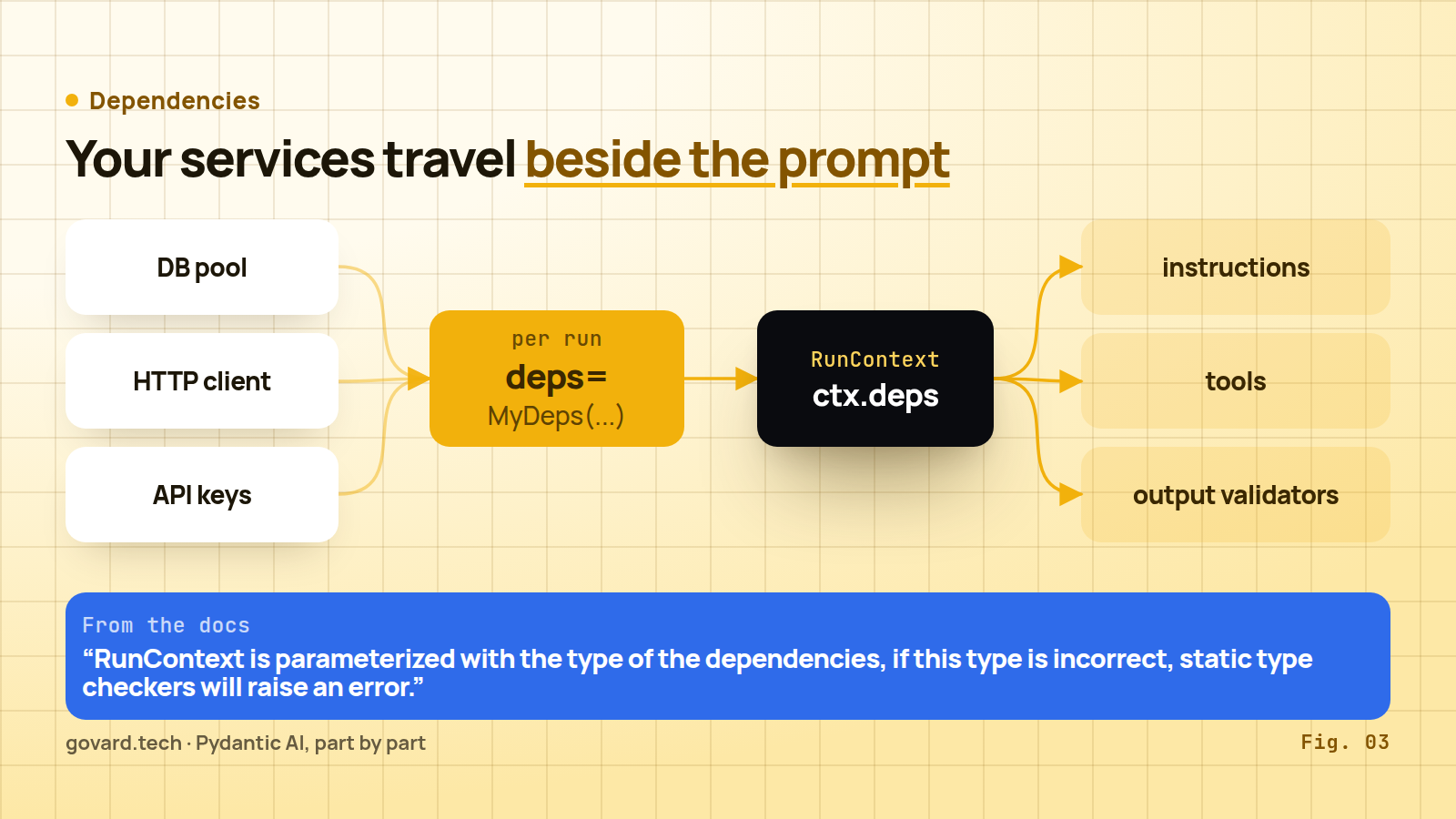
Source: Pydantic AI dependencies docs, November 2026.
“Pydantic AI uses a dependency injection system to provide data and services to your agent’s instructions, tools and output validators.” In practice you define a dataclass for what the agent needs and pass an instance per run:
@dataclass
class MyDeps:
    api_key: str
    http_client: httpx.AsyncClient

agent = Agent('openai:gpt-5', deps_type=MyDeps)
result = await agent.run('Tell me a joke.', deps=MyDeps('foobar', client))
Tools, instructions functions and validators receive it as ctx.deps. Two properties make this more than a convenience.
First, it is typed. “RunContext is parameterized with the type of the dependencies, if this type is incorrect, static type checkers will raise an error.” A tool that expects RunContext[ShopClient] on an agent declared with another deps type is caught before you run anything.
Second, it keeps secrets and live connections out of the prompt. The model sees tool schemas and tool results. Your database pool and API keys never enter the conversation unless you write them into instructions yourself. This is the clean answer to “how do I give my agent access to the CRM without pasting the CRM into the prompt”.
Testing follows from the same design: agent.override(deps=...) swaps the real HTTP client for a fake, and the agent never notices.
04 · Tools: the signature is the schema
Two decorators cover most cases. @agent.tool is “for tools that need access to the agent context”, and @agent.tool_plain is “for tools that do not need access to the agent context”. The dice game in the docs shows both:
@agent.tool_plain
def roll_dice() -> str:
    """Roll a six-sided die and return the result."""
    return str(random.randint(1, 6))

@agent.tool
def get_player_name(ctx: RunContext[str]) -> str:
    return ctx.deps
The docstring is not decoration. Pydantic AI “extracts parameter descriptions from the docstring and adds them to the schema”, in Google, NumPy or Sphinx format, and you can set require_parameter_descriptions=True to fail fast when one is missing. The model reads these descriptions to decide when and how to call the tool.
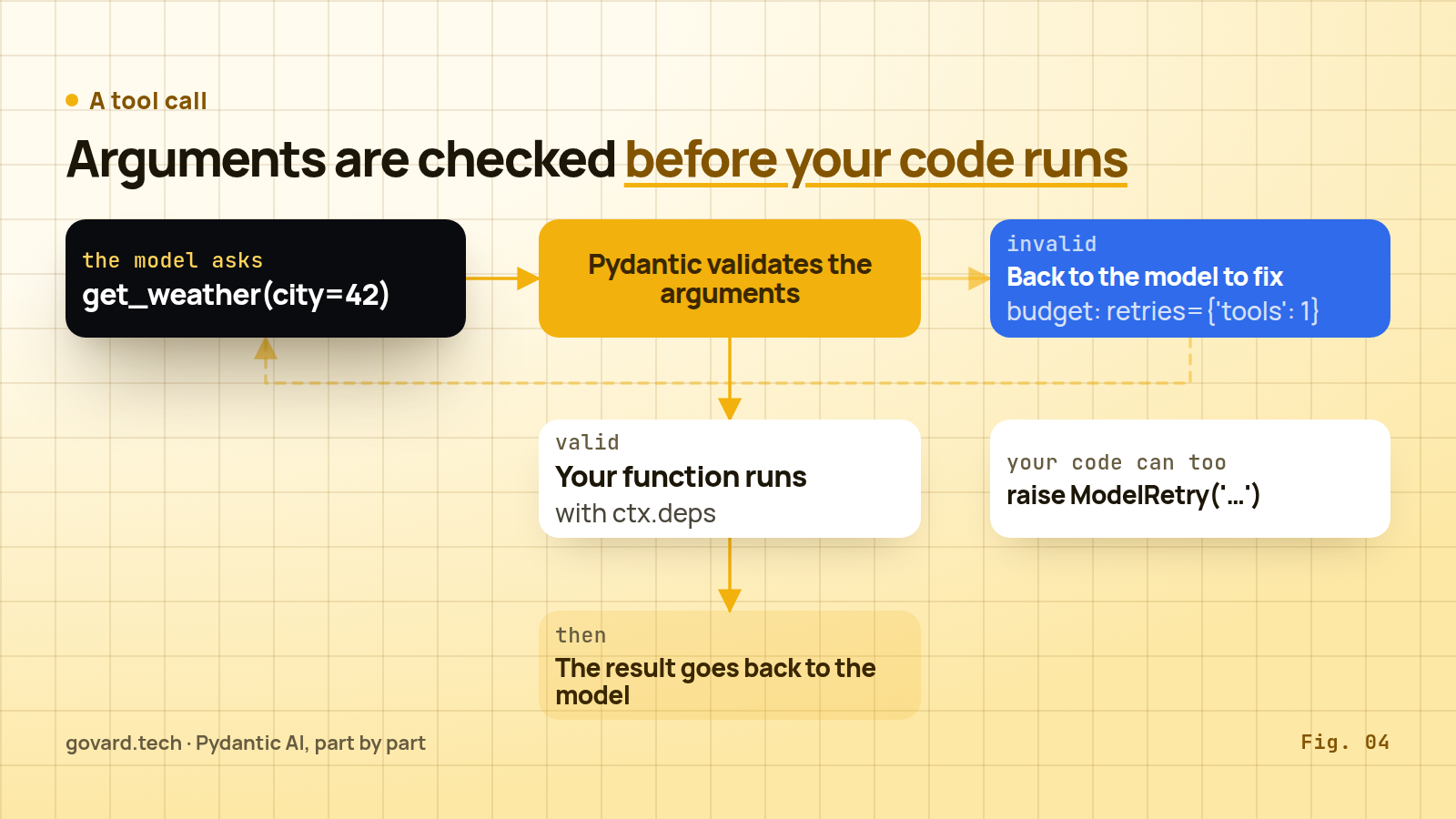
Source: Pydantic AI tools docs and retries docs, November 2026.
Validation before execution. When the model asks for get_weather(city=42) and your signature says city: str, the call never reaches your function. The validation error goes back to the model to fix, within the tool retry budget, which defaults to one. Your own code can do the same on purpose: “Raise ModelRetry when the model should try the tool call again with corrected arguments or a different approach.” In V2 the retry shows up in history as a ToolReturnPart with outcome='retried'.
Dynamic tools. A prepare function, “called at each step of a run”, can hide or reshape a tool depending on context.
Toolsets. Once you have more than a handful of tools, bundle them: FunctionToolset, CombinedToolset, and wrappers made with .filtered(), .prefixed(), renaming and ApprovalRequiredToolset. An offline lab in my research repo checked the nesting order: prefixed('inner') wrapped in prefixed('outer') gives tools named outer_inner_*.
MCP. V2 collapsed MCPServerStdio, MCPServerSSE, MCPServerStreamableHTTP and friends into one class: “a single MCPToolset whose transport is inferred from the arguments you pass”. MCPToolset('http://localhost:8000/mcp') in toolsets=[...] is the whole setup. The recommended path is the MCP capability, which “runs the MCP server locally by default” and can switch to the provider’s native MCP support with native=True. A2A, the agent-to-agent protocol, moved out to the separate fasta2a package; Agent.to_a2a() is gone.
Native tools. Builtin tools are now native tools: WebSearchTool, CodeExecutionTool, ImageGenerationTool, WebFetchTool, FileSearchTool and more, nine in the docs. They “are executed by the model provider’s infrastructure”, not by your process. If the provider doesn’t support one, “Pydantic AI will raise a UserError when you try to run the agent”.
05 · Output: a typed answer, or another try
Tools are what the model may do on the way; the output type is what it must hand back at the end. output_type decides what a run must return. It accepts scalars, lists and dicts, TypedDicts, dataclasses and Pydantic models, unions, and output functions. Three modes get the model there:
- Tool output, the default. The model returns structured data by calling an output tool, which is “supported by virtually all models”.
- Native output. The “model is required to produce text content compliant with a provided JSON schema”, enforced by the provider.
- Prompted output. “A prompt is injected into the model instructions including the desired JSON schema”, for models without the other two.
With a union like output_type=Fruit | Vehicle, “each member is registered with the model as a separate output tool”. If str is among the types, plain text counts as an answer.
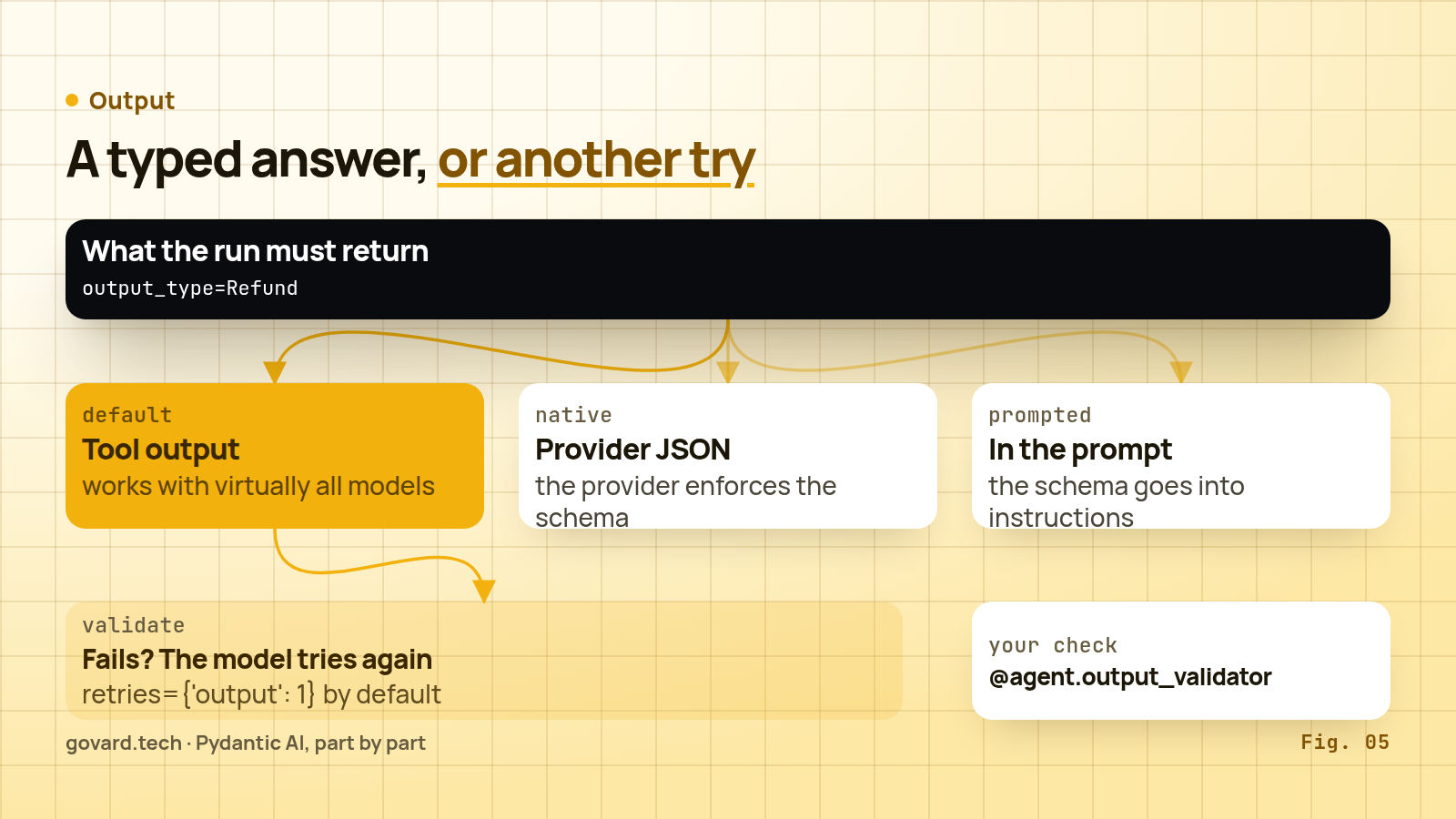
Source: Pydantic AI output docs, November 2026.
When validation fails, the answer goes back to the model, within the output retry budget (default one). For checks that need I/O, such as looking up whether an order exists, add an @agent.output_validator that can raise ModelRetry. Structured output streams too: result.stream_output() yields partial objects as the model writes them, which is how you show a profile filling in field by field.
06 · The run, under the hood
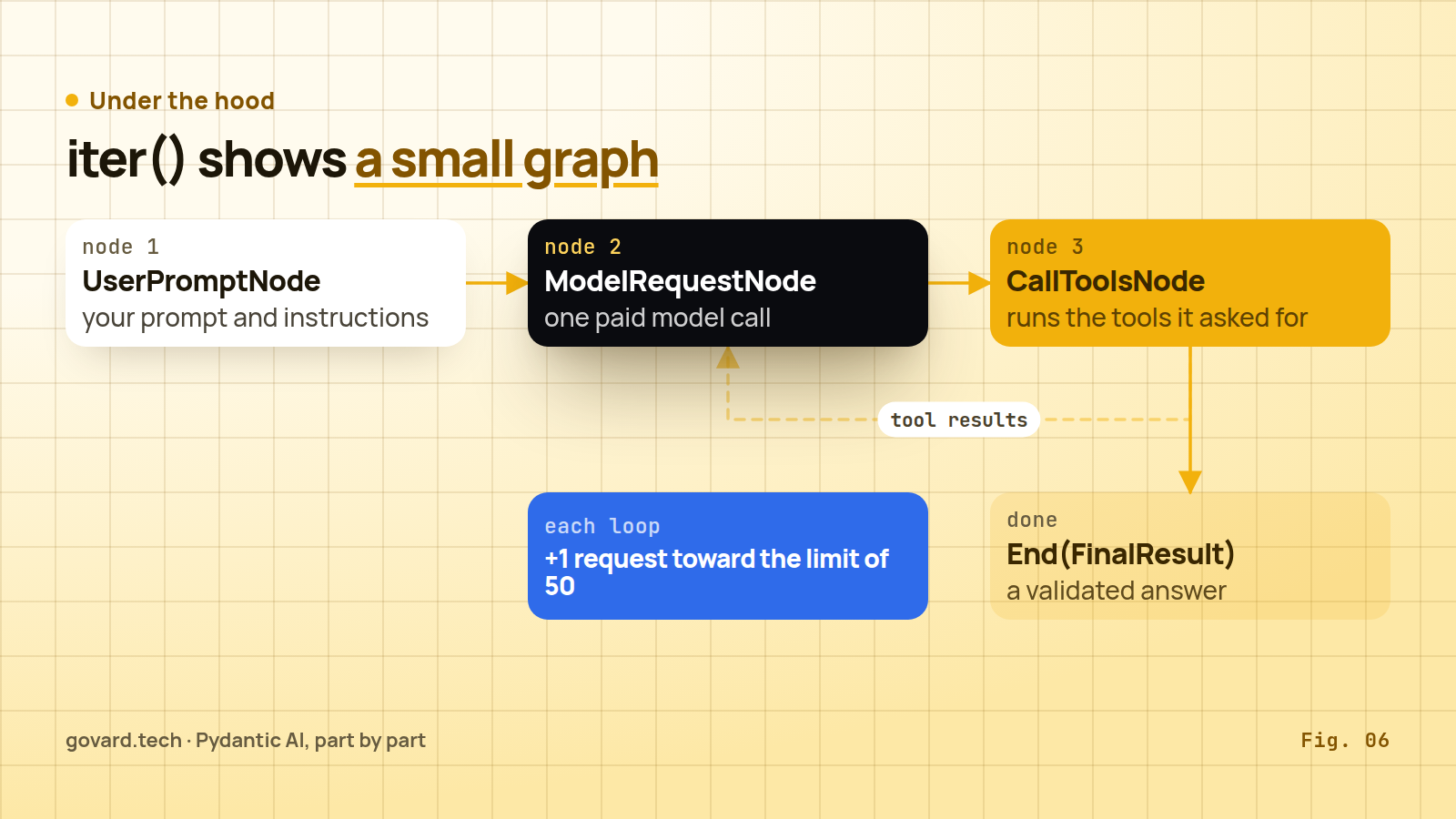
Source: Pydantic AI agent docs, iter example.
A run is a small graph, and iter() lets you walk it. The docs’ example prints the nodes: UserPromptNode with your prompt and instructions, ModelRequestNode for a call to the model, CallToolsNode that executes the tools the model asked for, and finally End(data=FinalResult(...)). Model request and tool calls loop until the model produces a valid output. With async for node in agent_run you can log every step, inspect it or stop early.
Each trip through ModelRequestNode is a paid request, which is why the default limit matters: “With no usage_limits, a run gets the default UsageLimits, whose request_limit is 50.” And the behaviour at the limit is strict: “A run that reaches its request_limit raises instead of returning output, even when the model has already gathered what it needs.”
UsageLimits field | Default |
|---|---|
request_limit | 50 |
tool_calls_limit | off; checked before tools run |
input_tokens_limit, output_tokens_limit, total_tokens_limit | off |
per_request_input_tokens_limit | off; caps any single request’s input |
cost_limit | off; “Don’t rely on cost_limit as a hard billing guarantee” |
If parallel tool calls would exceed tool_calls_limit, “no tools will be executed”. Set limits for your workload; 50 only catches runaway loops.
The docs also give a recipe for the strict limit: a capability “can compare the requests made so far with the limit, tell the model how many requests it has left, and take its function tools away on the last request, so the only thing left for it to do is produce its output”. And one caveat links this section to the next: request_limit “counts the model responses committed to each run’s history, and never sees the fallback attempts, other RetryModelRequest attempts, SDK client retries and transport retries beneath them”. A limit of 50 means 50 responses, not 50 network requests.
07 · Eight kinds of retry, and why they multiply
The retries page opens with a warning: “‘Retry’ means eight different things in an agent run, at eight different layers, and they don’t share budgets. Mixing them up is the usual cause of a run that retries far more (or far less) than expected.”
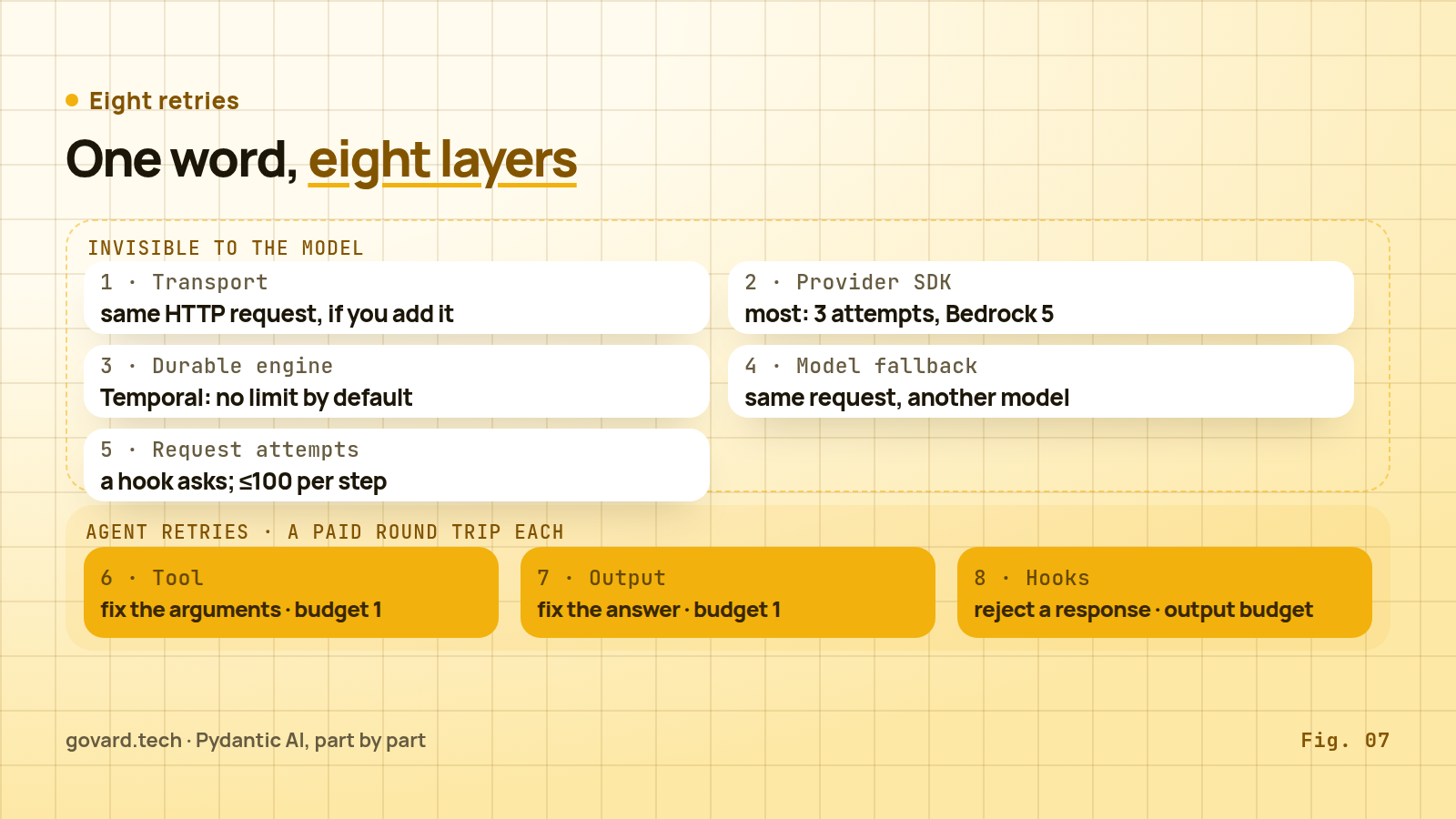
Source: Pydantic AI retries docs, November 2026.
| # | Layer | What repeats | Default |
|---|---|---|---|
| 1 | Transport | the same HTTP request, through a retrying transport you add | off unless you add one |
| 2 | Provider SDK | the same request, by the SDK client | most make 3 attempts; Google, Mistral, Hugging Face 1; Bedrock 5; xAI up to 5 |
| 3 | Durable engine | the whole model request | Temporal: “unbounded by default (maximum_attempts=0)”; DBOS and Prefect: no retry |
| 4 | Model fallback | the same request, on another model | one attempt per model in the chain |
| 5 | Model request attempts | a step, when a hook raises RetryModelRequest | no budget; “at most 100 times” |
| 6 | Tool | one tool call, the model asked to fix it | budget 1 |
| 7 | Output | the final answer, the model asked to fix it | budget 1 |
| 8 | Model-request hooks | a request, when a hook raises ModelRetry | shares the output budget |
The first five are “invisible to the model: it never sees an attempt fail”. “Only the last three are ‘agent retries’ — they cost a model round trip each.”
The layers don’t share budgets, “but they stack”. The docs work an example with ordinary settings: two output retries, the OpenAI SDK’s default max_retries=2, a transport with stop_after_attempt(2), no fallback model.
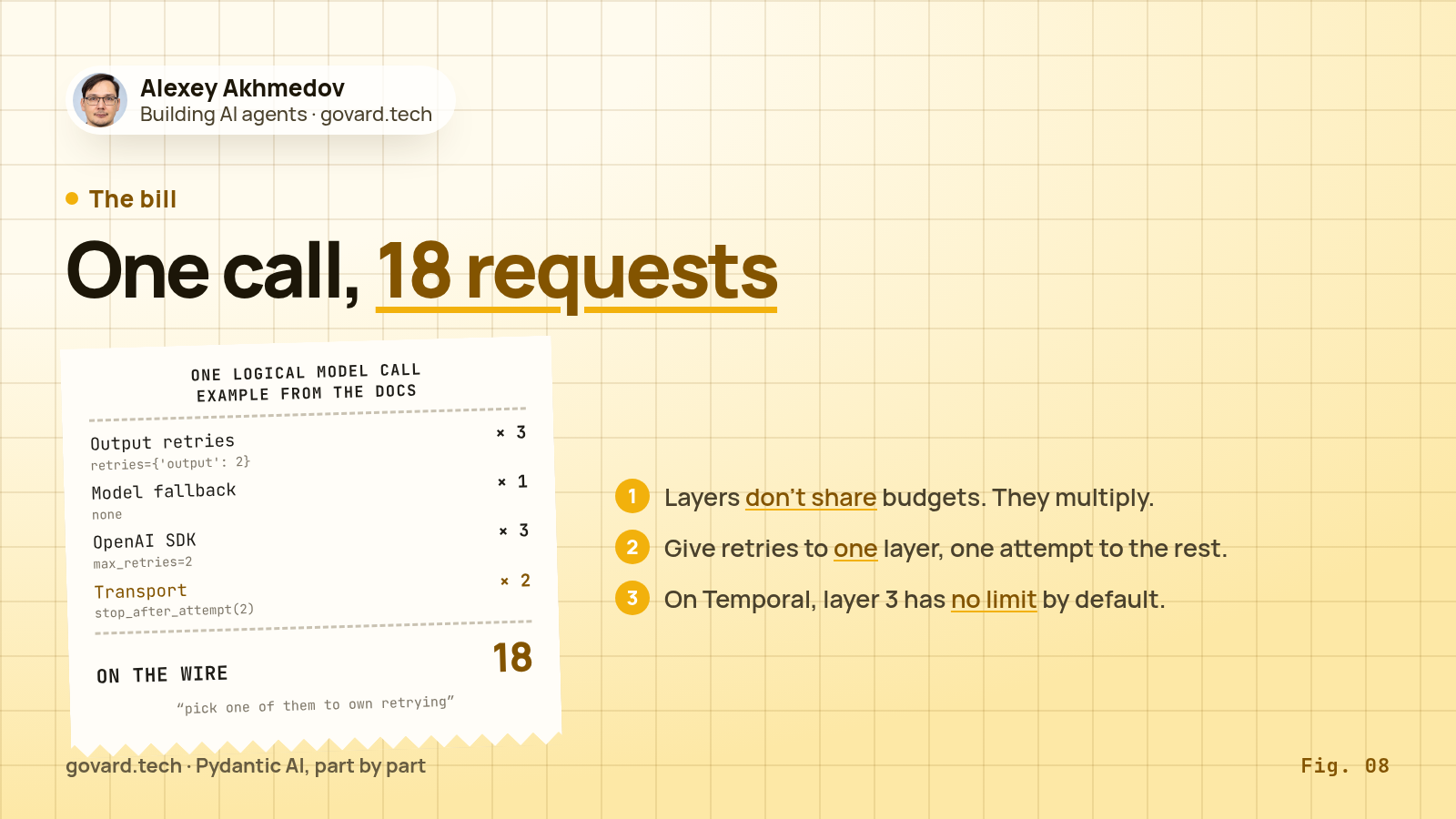
Source: worked example in the Pydantic AI retries docs.
3 × 1 × 3 × 2 = 18 requests on the network for one logical call, “and twice that with a fallback model of two models”. Put the same agent on Temporal with its default unlimited activity retries and the worst case has no upper bound at all. The advice in the docs is short: “pick one of them to own retrying, and give the others a single attempt”.
My take: in a durable setup, give retries to the workflow engine and set maximum_attempts yourself; set provider SDK retries to zero or one and keep tool and output budgets at one. The price is slower recovery when a provider flakes for a few seconds, because the engine’s retry is heavier than an SDK’s quick resend. Without a durable engine, let the provider SDK own transient errors and keep everything else at a single attempt. Either way, write the choice down: the next engineer will otherwise add a fourth layer.
08 · People in the loop and runs that survive a crash
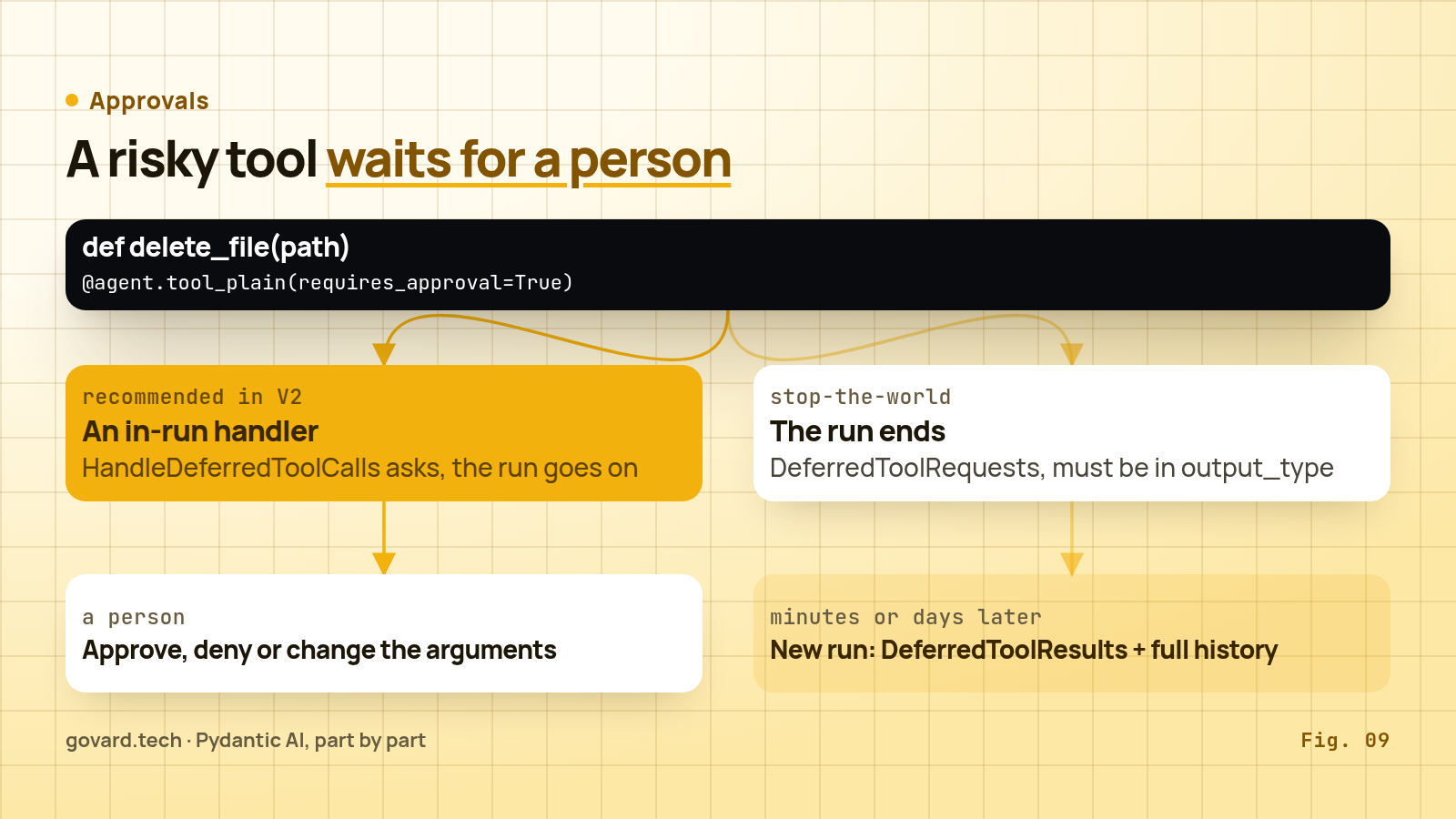
Source: Pydantic AI deferred tools docs, November 2026.
Approvals. Mark a tool with requires_approval=True, or raise ApprovalRequired inside it when only some calls need a person:
@agent.tool_plain(requires_approval=True)
def delete_file(path: str) -> str:
    return f'File {path!r} deleted'

@agent.tool
def update_file(ctx: RunContext, path: str, content: str) -> str:
    if path == '.env' and not ctx.tool_call_approved:
        raise ApprovalRequired
    return f'File {path!r} updated: {content!r}'
V2 offers two ways to handle the pause. The recommended one is an in-run handler: register the HandleDeferredToolCalls capability, ask the person from inside the run, and continue. The other is “stop-the-world”: the run ends with a DeferredToolRequests output listing each pending call with its name, arguments and call ID. For that, DeferredToolRequests must be part of the agent’s output_type. Later, minutes or days, you start a new run with DeferredToolResults, where each call is approved, denied with a message, or approved with overridden arguments.
The offline lab in my research repo ran the stop-the-world round trip (ApprovalRequiredToolset) on pydantic-ai 2.33.0 in August 2026 with TestModel, no network and no keys; it passed 17 checks covering capabilities, approvals, hooks and usage limits. Three results are worth knowing. No gated tool ran before the decision: the first run returned only the pending approvals. The decisions survived a simulated crash as plain JSON, so a queue of approvals can live in an ordinary database table. A denial reached the model as a normal tool result, not as a request to retry, so the run finished cleanly. And one trap: if you send the decisions as a new user prompt, Pydantic AI raises UserError (“Cannot provide a new user prompt when the message history contains unprocessed tool calls”). Pass them as deferred_tool_results= together with the full message_history.
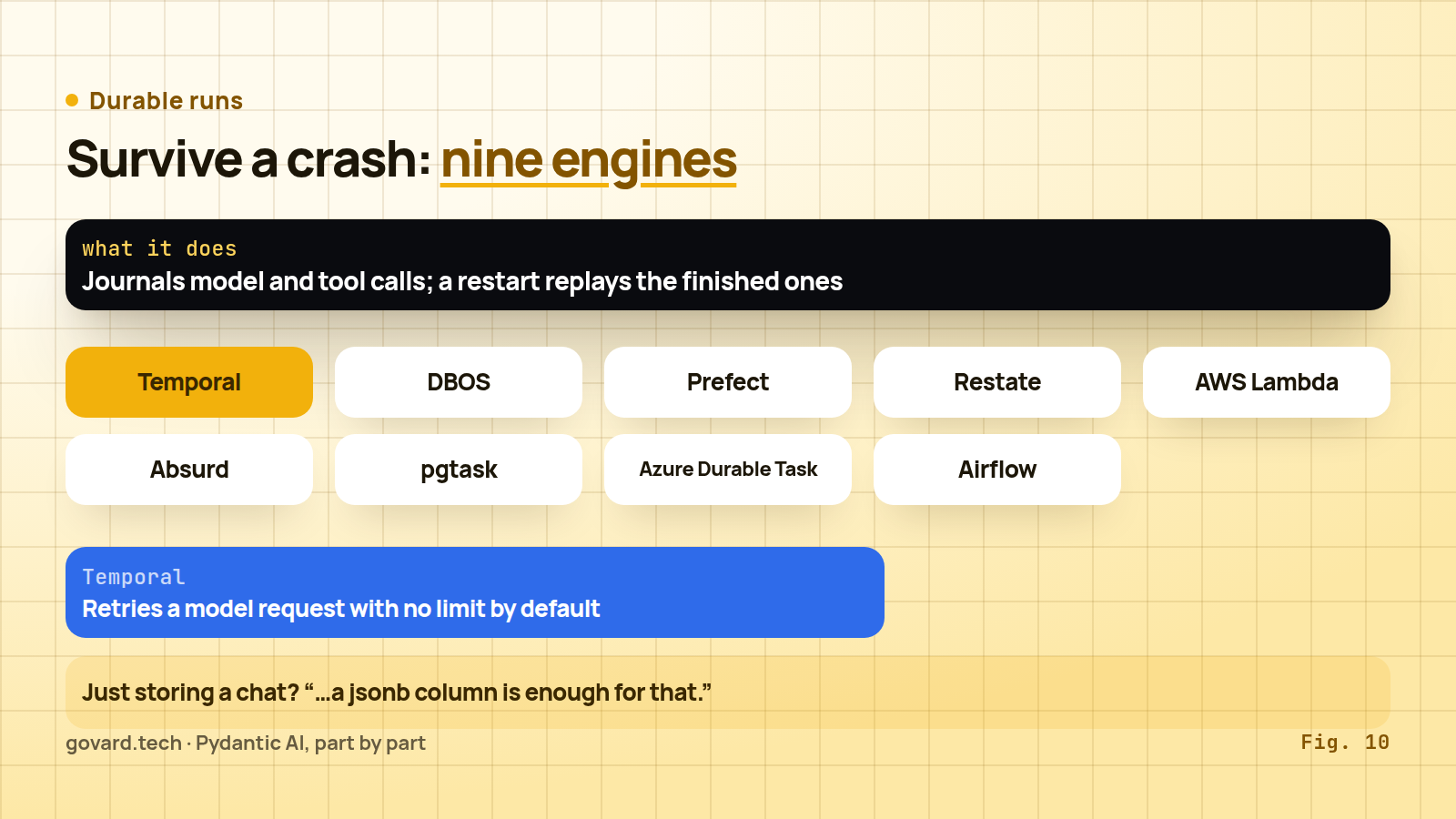
Durable runs. Approvals that wait for hours, deploys mid-run and flaky APIs all ask the same question: what happens to a run when the process stops? “Pydantic AI supports nine durable execution engines, plus a builder for any other engine”: Temporal, DBOS, Prefect, Restate, AWS Lambda, Absurd, pgtask, Azure Durable Task and Apache Airflow. When we published the ranking on October 23, there were eight. The mechanism is journaling: “A durable engine journals the agent’s model requests and the tool calls it wraps, and a restarted run replays the completed ones from the journal and retries the one in flight.”
Source: Pydantic AI durable execution docs, November 2026.
Three constraints from the docs. One engine per agent: “attaching a second one … raises a UserError”. On Temporal, attaching TemporalDurability “does not by itself make runs durable”; the run must execute inside a Temporal workflow your application starts, dependencies must serialize, and Temporal limits payloads to 2 MB by default.
Storage is not durability. For chat history, the docs are blunt: “Reaching for a durable engine because you wanted to store a chat thread is the common mistake — a jsonb column is enough for that.” An agent’s memory of the conversation “is its message history”. V2 adds a Conversation object (result.conversation out, conversation= back in) and a ConversationStore that stores each message once, catches conflicting saves and supports forking.
09 · Capabilities and Harness: the V2 building blocks
Source: Pydantic AI capabilities docs, November 2026.
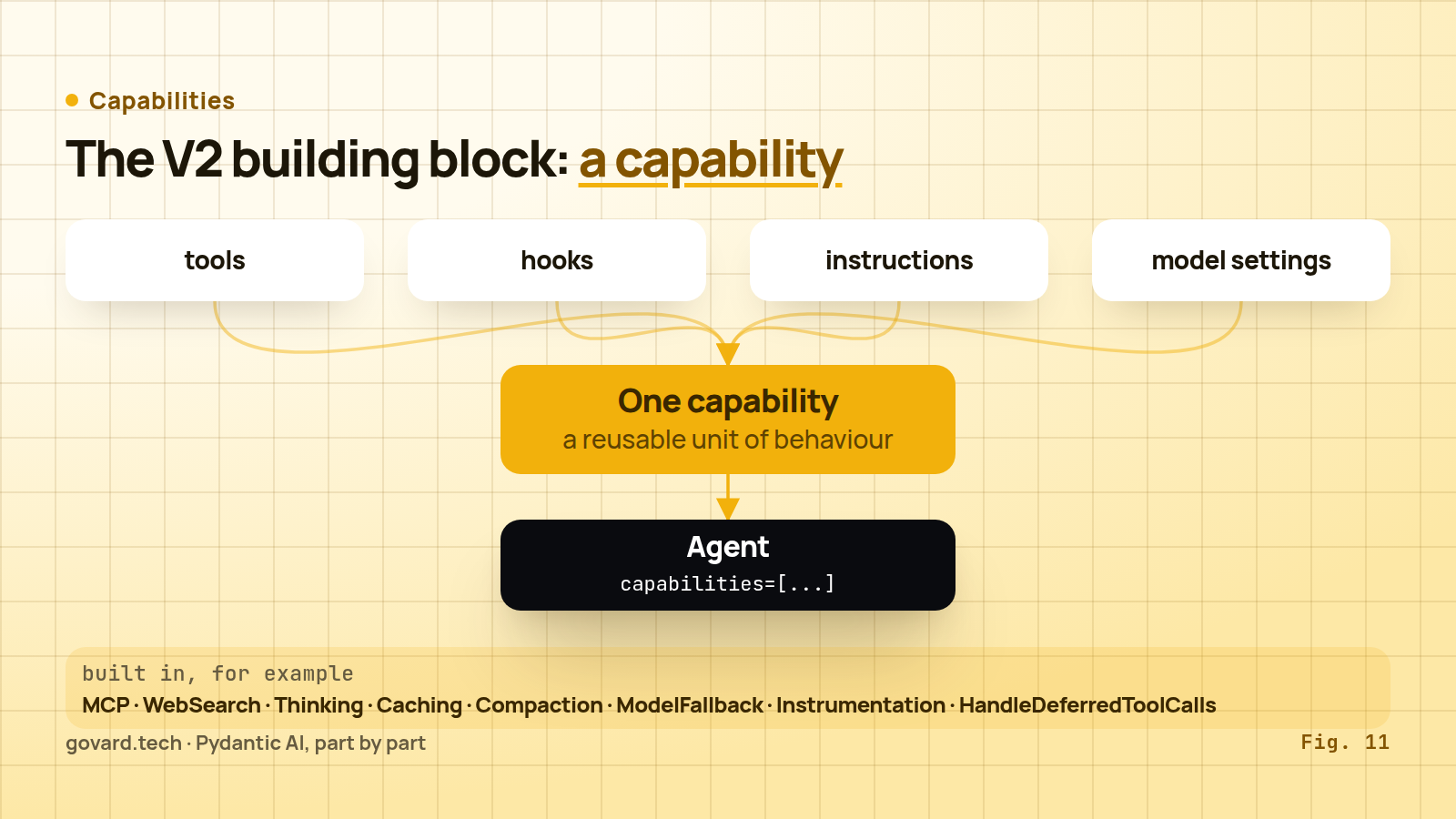
The biggest idea in V2 is the capability: “a reusable, composable unit of agent behavior”. One capability can contribute tools, lifecycle hooks, instructions, model settings, even the model. “Whether you’re building a memory system, a guardrail, a cost tracker, or an approval workflow, a capability is the right abstraction.”
That is why so many V1 arguments moved. instrument= became the Instrumentation capability, history_processors= became ProcessHistory, prepare_tools= became PrepareTools, fallback became ModelFallback. Core capabilities include MCP, WebSearch, WebFetch, Thinking, Caching (several providers, including Anthropic, “cache nothing unless the request asks them to”), Compaction, HandleDeferredToolCalls, Hooks and more.
Hooks let a capability watch each stage of the loop (before, after, wrap, on error) for runs, nodes, model requests, tools and output. A cost tracker reads usage in an after_model_request hook (Harness ships one as SpendLimits); a guardrail can raise ModelRetry there, which, as layer 8 showed, draws on the output budget. The lab found one more trap: tools in a step run concurrently, so a wrap hook that keeps shared state must be safe for concurrent calls.
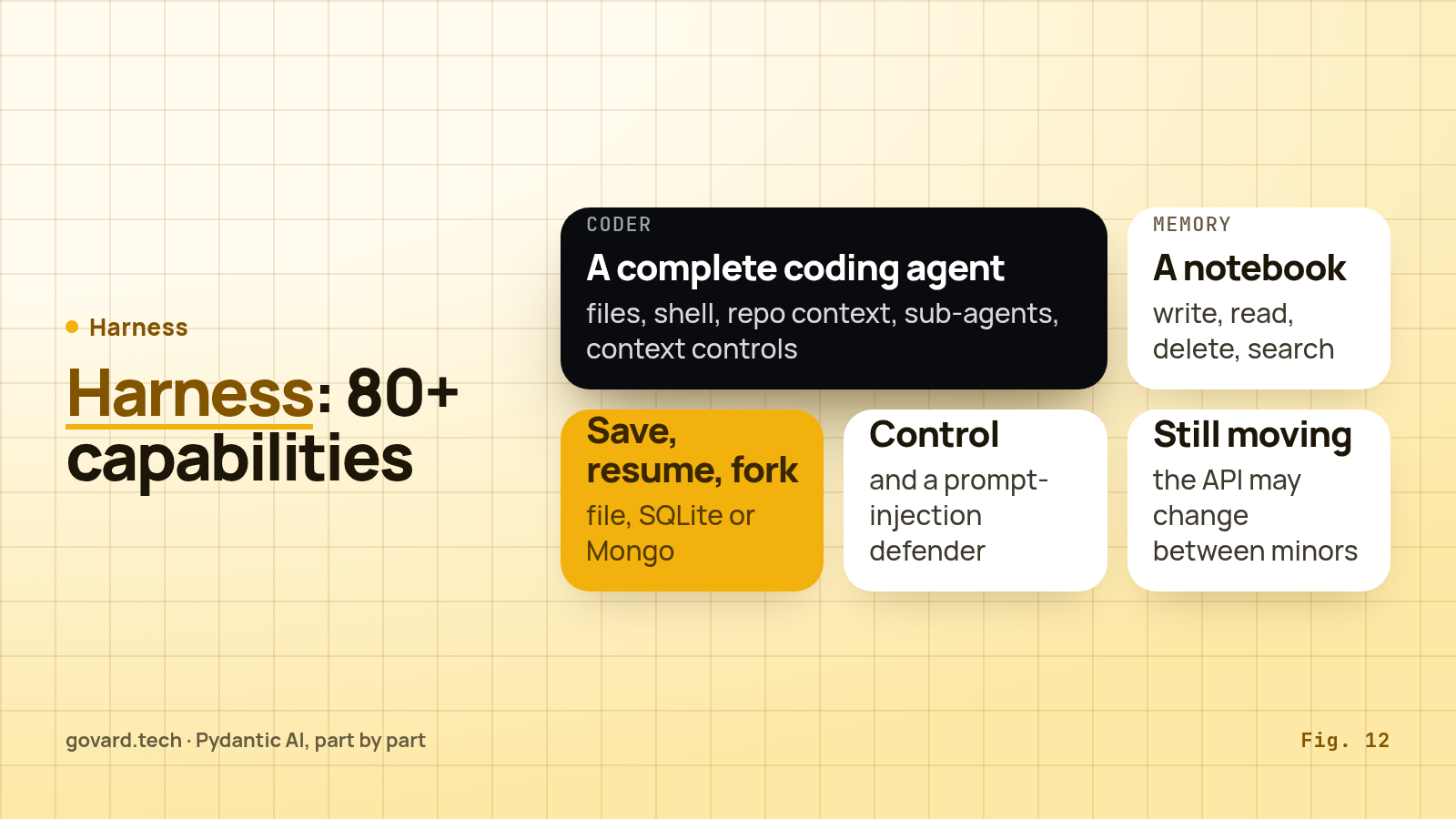
Harness is where the heavy capabilities live, in a separate package: “Pydantic AI Harness is the official capability and harness library for Pydantic AI”, and “there are 80+ of them”. A few that change what an agent can do:
Coder, “a complete coding-agent stack”: file system, shell, repo context, planning, a read-only explorer sub-agent, and context controls that clear old tool results and cut tool output at 64,000 characters. The docs warn thatLocalWorkspace('.')“is not a sandbox, so commands can reach anything you can”, and Harness ships sandbox options from Docker and SSH to Modal, E2B and Daytona.Memory, “a persistent, namespaced notebook” with four tools (write_memory,read_memory,delete_memory,search_memory). Your code sets the namespace, for example a user ID, “so the model cannot reach another user’s files”.StepPersistence: save, resume, continue and fork runs on file, SQLite or Mongo, without a durable engine.- Control:
Guardrails,SpendLimits,PromptInjectionDefender,DetectLoops,AskUser.
Harness is on 0.x, and the docs say so: “the API may change between minor releases”. Pin it tighter than the core.
Source: Pydantic AI Harness docs, November 2026.
10 · Many agents: five levels, climb only when needed
Source: Pydantic AI multi-agent docs and graph docs, November 2026.
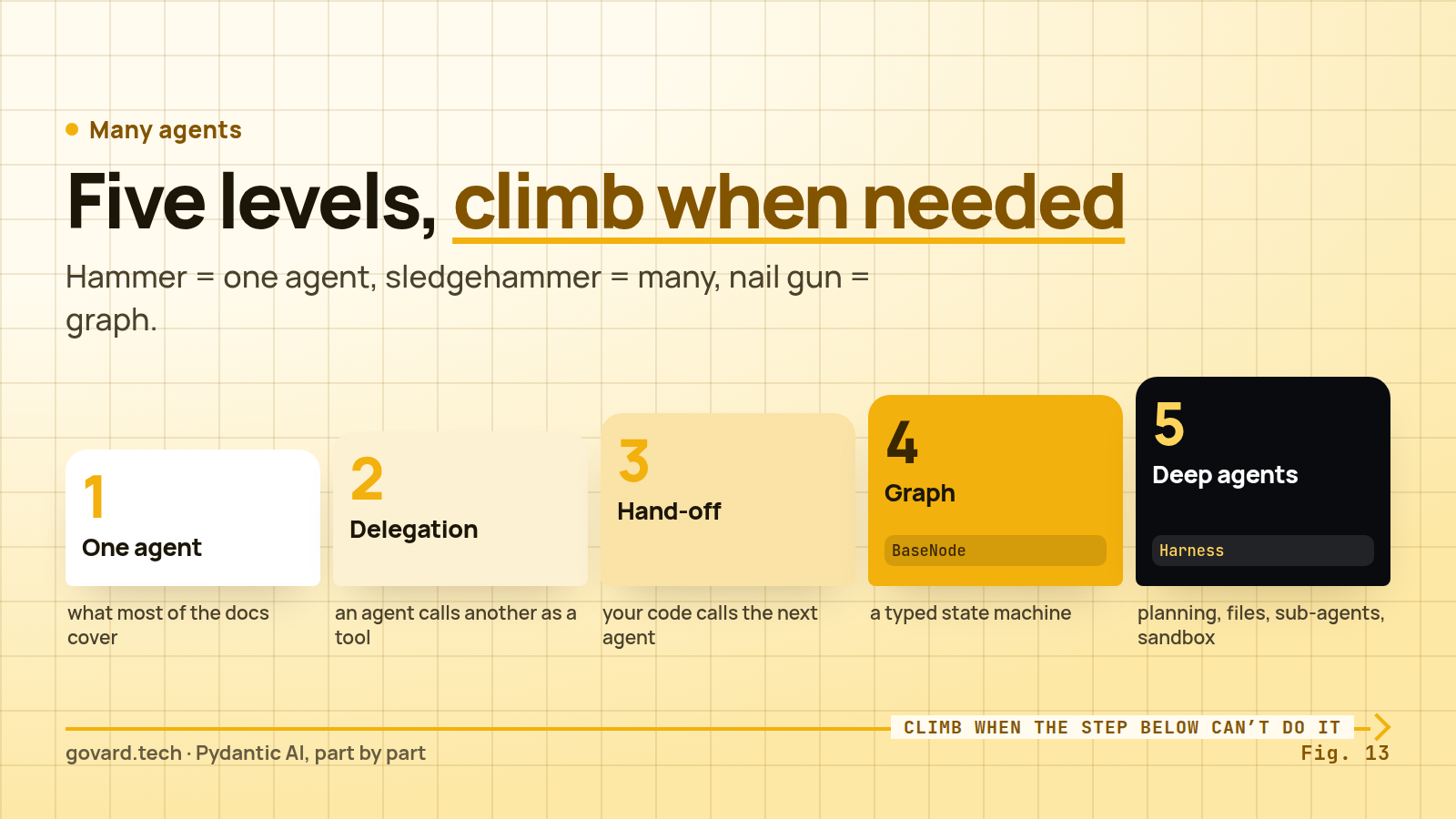
The docs describe five levels of complexity, and the order is a recommendation:
- Single agent workflows, “what most of the
pydantic_aidocumentation covers”. - Agent delegation: “agents using another agent via tools, either wired up by hand or with the Harness’s
SubAgentscapability”. - Programmatic agent hand-off: “one agent runs, then application code calls another agent”.
- Graph based control flow, “for the most complex cases”.
- Deep Agents: “autonomous agents with planning, file operations, task delegation, and sandboxed code execution”.
Delegation is just a tool that runs another agent. The one rule that matters is accounting: pass usage=ctx.usage so the delegate’s requests count toward the parent’s limits.
@joke_selection_agent.tool
async def joke_factory(ctx: RunContext, count: int) -> list[str]:
    r = await joke_generation_agent.run(
        f'Please generate {count} jokes.',
        usage=ctx.usage,
    )
    return r.output
Without it, a parent capped at 50 requests can call a delegate that makes 50 of its own, and your limit protects nothing.
The graph. pydantic-graph is “an async graph and state machine library for Python where nodes and edges are defined using type hints”. Nodes are usually dataclasses; the return annotation of a node’s run method declares its outgoing edges, and End stops the graph. The docs are unusually honest about when to use it: “If Pydantic AI agents are a hammer, and multi-agent workflows are a sledgehammer, then graphs are a nail gun”, and “Don’t use a nail gun unless you need a nail gun.” The positive rule: “Reach for pydantic-graph when control flow is the hard part: explicit states, branches and resumable transitions you want typed and diagrammed.”
V2 promoted the builder API (GraphBuilder, with step, decision, spread, broadcast and join nodes) out of beta. It also removed pydantic_graph.persistence, and the builder API “doesn’t snapshot graph state”. If you need to save and resume an agent run, the docs point to Harness StepPersistence or a durable engine, not to the graph.
11 · Evals, tests and observability
Everything above, from tool validation to approvals, can be tested without calling a real model, and graded once it runs in production.
Source: Pydantic AI evals and testing docs, November 2026.
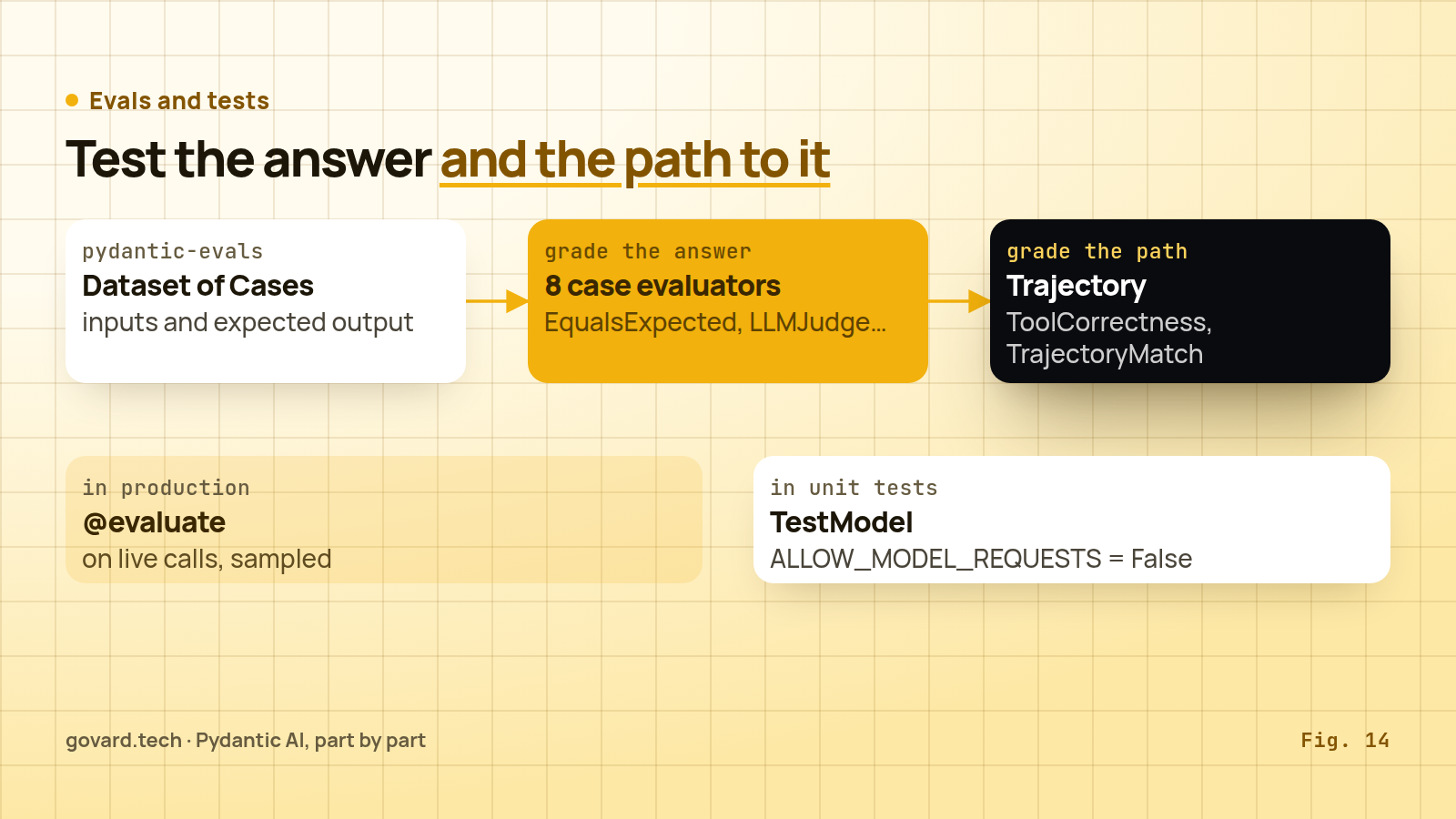
Evals. pydantic-evals “grades an agent’s final outputs and its trajectory (the sequence and arguments of its tool calls), against datasets in code or, with online evaluation, against a sample of live production traffic”. A dataset is a list of cases with inputs and expected outputs:
dataset = Dataset(name='capital_quiz', cases=[
    Case(name='simple_case', inputs='What is the capital of France?', expected_output='Paris'),
])
There are eight built-in case evaluators: EqualsExpected, Equals, Contains, IsInstance, MaxDuration, LLMJudge, GEval and HasMatchingSpan. The trajectory evaluators are the interesting ones for agents: ToolCorrectness, TrajectoryMatch, ArgumentCorrectness, MaxToolCalls and MaxModelRequests are “deterministic, span-based evaluators that grade an agent’s trajectory”. They read OpenTelemetry spans, so they need pydantic-evals[logfire] but not a Logfire account. Online evaluation attaches evaluators to production functions with an @evaluate decorator, on every call or a sample.
Unit tests. “Use TestModel or FunctionModel in place of your actual model to avoid the usage, latency and variability of real LLM calls.” TestModel calls every tool with arguments generated from their schemas, then returns text or structured output; “there’s no ML or AI in TestModel”. Set models.ALLOW_MODEL_REQUESTS = False globally so a test that forgets the override fails instead of billing you, and use agent.override(model=TestModel()) in the test itself. The offline lab ran its whole approval round trip this way, with deterministic tool call IDs that are convenient for snapshot tests.
Observability. “Pydantic AI emits OpenTelemetry traces of every run, model request and tool call.” Logfire, Pydantic’s commercial product, is one destination, but the instrumentation “is plain OpenTelemetry”, so the same spans can go to your own backend. In V2 you enable it with the Instrumentation capability. Span attributes may change in minor releases.
12 · Moving from V1 to V2, and when to take it
If you have a V1 codebase, the path in the docs is: upgrade to the latest V1 (1.100.0 or newer), remove every deprecation warning, then move to V2. The changes you are most likely to hit:
Agent(builtin_tools=[...])becomesAgent(capabilities=[NativeTool(...)]); everything named builtin is now native.Agent(mcp_servers=[...])becomesAgent(toolsets=[...]), and the four MCP server classes becomeMCPToolset.- Model strings need a provider prefix;
openai:now means the Responses API. output_retries=andtool_retries=becomeretries={'output': N}andretries={'tools': N}.instrument=,history_processors=,prepare_tools=andevent_stream_handler=become capabilities.Agent.to_a2a()moves to thefasta2apackage;to_ag_ui()becomesAGUIAdapter.end_strategydefaults to'graceful', so tools requested next to a final output now run.- A bare
pip install pydantic-aiinstalls fewer extras: Bedrock, Groq, Mistral, Cohere, xAI, Temporal and AG-UI now need explicit extras. pydantic_graph.persistenceandpydantic_graph.mermaidare gone.
The good news: “Message history serialized with V1 … continues to deserialize in V2”, so stored conversations survive the upgrade.
Source: Stack Overflow Developer Survey 2026; Pydantic AI docs.
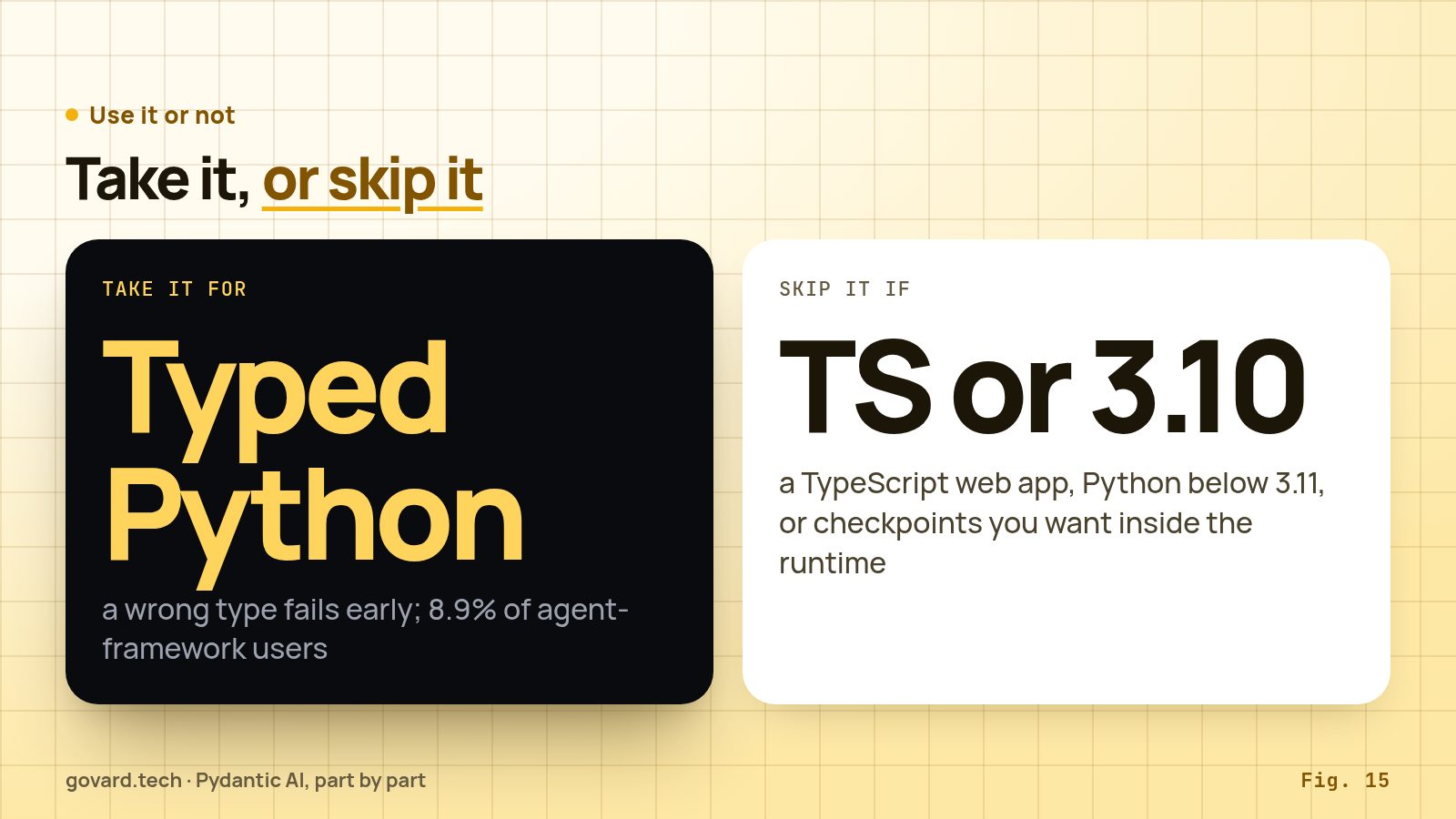
Take Pydantic AI when your agent lives in a Python service and wrong data should fail early: typed dependencies, validated tool arguments and a guaranteed output type remove a whole class of bugs that other frameworks leave to prompts. It fits teams that want a library they call from their own code. Tiger Data, in a case study on the vendor’s site, chose it as “a library for the LLM and agent parts, not an opinionated framework for the whole project”; Overjoy, in another vendor case study, left LangChain because it was “overly complicated”. Treat both as vendor material: Pydantic sells Logfire.
Plan extra work for retries (pick one owner and write it down), explicit usage limits for your workload, and Harness’s 0.x API if you use it.
Skip it or look elsewhere when you cannot run Python 3.11 or newer; when your agent lives in a TypeScript web app, where the Vercel AI SDK is the native choice; or when checkpointed graph state is the centre of your design and you want it built into the runtime, which is LangGraph’s model (see our guides to LangChain, layer by layer and the OpenAI Agents SDK, part by part). Pydantic AI leaves durability to external engines; LangGraph makes checkpoints its core.
A checklist before production:
- Declare
deps_typeandoutput_typeon every agent; no untypedAgent(...). - Set
UsageLimitsfor your workload instead of relying on 50. - Pick one retry owner; set provider SDK retries and Temporal
maximum_attemptsexplicitly. - Pass
usage=ctx.usageto every delegate agent. - Use the in-run approval handler, or keep
DeferredToolRequestsinoutput_typeand resume with the full history. - Run unit tests with
TestModelandALLOW_MODEL_REQUESTS = False. - Add at least one trajectory evaluator for tools that change data.
- Pin
pydantic-aito a minor version andpydantic-ai-harnesstighter.
Who owns the retries in your agent stack today: the provider SDK, the framework or the workflow engine? If the answer is “all three”, you now know what that costs.
FAQ
What is Pydantic AI? A typed agent library for Python from the team behind Pydantic; the current release is 2.66.0 (November 4, 2026).
What changed in V2? Capabilities became the core extension point; builtin tools became native tools, MCP classes merged into MCPToolset, model strings need a provider prefix.
How many times does it retry a failed request? It depends on eight layers that multiply; the docs’ example reaches 18 requests for one call.
What is the default request limit? 50 model requests per run, after which the run raises.
Do I need pydantic-graph for many agents? Usually not: delegation and hand-off cover most cases.